---
title: 5 Things HubSpot Clone Feature Can't Do and Why You Should Consider CloneNer
description: Discover the limitations of HubSpot's native cloning feature and how CloneNer enhances record duplication with automation and flexibility for improved CRM efficiency.
image: https://www.4crms.com/hubfs/beautiful-woman-dressed-formally-office.jpg
---
[](https://www.4crms.com/)
- [Our Apps](https://www.4crms.com/apps-catalog)
- [CloneNer Clone & Automate Best in Class Automation App](https://www.4crms.com/clonener)
- [LineNer Manage Products & Bundles](https://www.4crms.com/linener)
- [Copy Line Items Between Deals](https://www.4crms.com/copy-line-items-between-deals)
- [Notifyer Track & Get Notified](https://www.4crms.com/notifyer)
- [Data Bridge Extend & Access Instantly](https://www.4crms.com/data-bridge)
- [FlowNer Enroll Contacts in Sequences (Get Sequences for Starter Hub)](https://www.4crms.com/flowner)
- [See all...](https://www.4crms.com/apps-catalog)
- [Pricing](https://www.4crms.com/pricing)
- [Success Stories](https://www.4crms.com/success-stories)
- [RevOps Works & FlowNer New!](https://www.4crms.com/success-story-revops-works-flowner)
- [LUNOS Slovenija & Copy Line Items New!](https://www.4crms.com/streamline-hubspot-quoting-with-copy-line-items)
- [Zestey Consulting & Data Bridge](https://www.4crms.com/how-zestey-consulting-optimized-hubspot-with-data-bridge)
- [Zestey Consulting & LineNer](https://www.4crms.com/how-zestey-consulting-setup-the-ability-to-add-discounts-and-billing-terms)
- [Velocity Growth & CloneNer](https://www.4crms.com/success-story-velocity-growth-clonener)
- [Veeva Systems & LineNer](https://www.4crms.com/linener-veeva-systems)
- [Grupo Servica & CloneNer Interview with Customer Q&A](https://www.4crms.com/blog/success-stories-how-grupo-servica-use-clonener-in-hubspot)
- [Archy & FlowNer Interview with Customer Q&A](https://www.4crms.com/success-story-how-archy-automates-sales-sequences-with-flowner)
- [For Partners](https://www.4crms.com/for-partners)
- [Partner With Us](https://www.4crms.com/for-partners)
- [Our Partners](https://www.4crms.com/hubspot-partner-experts)
- Resources
- [Knowledge Base](https://www.4crms.com/help)
- [Our Security Measures](https://www.4crms.com/security-policy)
- [Our Happy Customers](https://www.4crms.com/testimonials)
- [Blog](https://www.4crms.com/blog)
- [Help](https://www.4crms.com/help)
[Contact us ](https://www.4crms.com/contact-us)
1. [Home](https://www.4crms.com/)
2. [Blog - HubsGrowth](https://www.4crms.com/blog)
3. [5 Things HubSpot Clone Feature Can't Do and Why You Should Consider CloneNer](https://www.4crms.com/blog/5-things-hubspot-clone-feature-cant-do-and-why-you-should-consider-clonener)
Share

\# CloneNer
# 5 Things HubSpot Clone Feature Can't Do and Why You Should Consider CloneNer
**Last updated:** 19 May 2026
Discover the limitations of HubSpot's native cloning feature and how CloneNer enhances record duplication with automation and flexibility for improved CRM efficiency.

If you work in HubSpot long enough, one need comes up again and again: **duplicating records without rebuilding everything manually**.
Maybe you need to recreate a deal with similar line items. Maybe you want to duplicate a ticket structure for a repeat process. Or maybe you’re trying to automate the creation of near-identical records inside a workflow.
HubSpot does support record cloning natively - but only up to a point. Once teams need more control, more automation, or more complete duplication, they usually start looking for alternatives.
This article breaks down:
- what HubSpot can clone natively,
- whether cloning can happen through workflows,
- where the native feature falls short,
- and how [**CloneNer**](https://app.hubspot.com/marketplace/39685994/listing/clonener-2156213) helps teams automate advanced record duplication inside HubSpot.
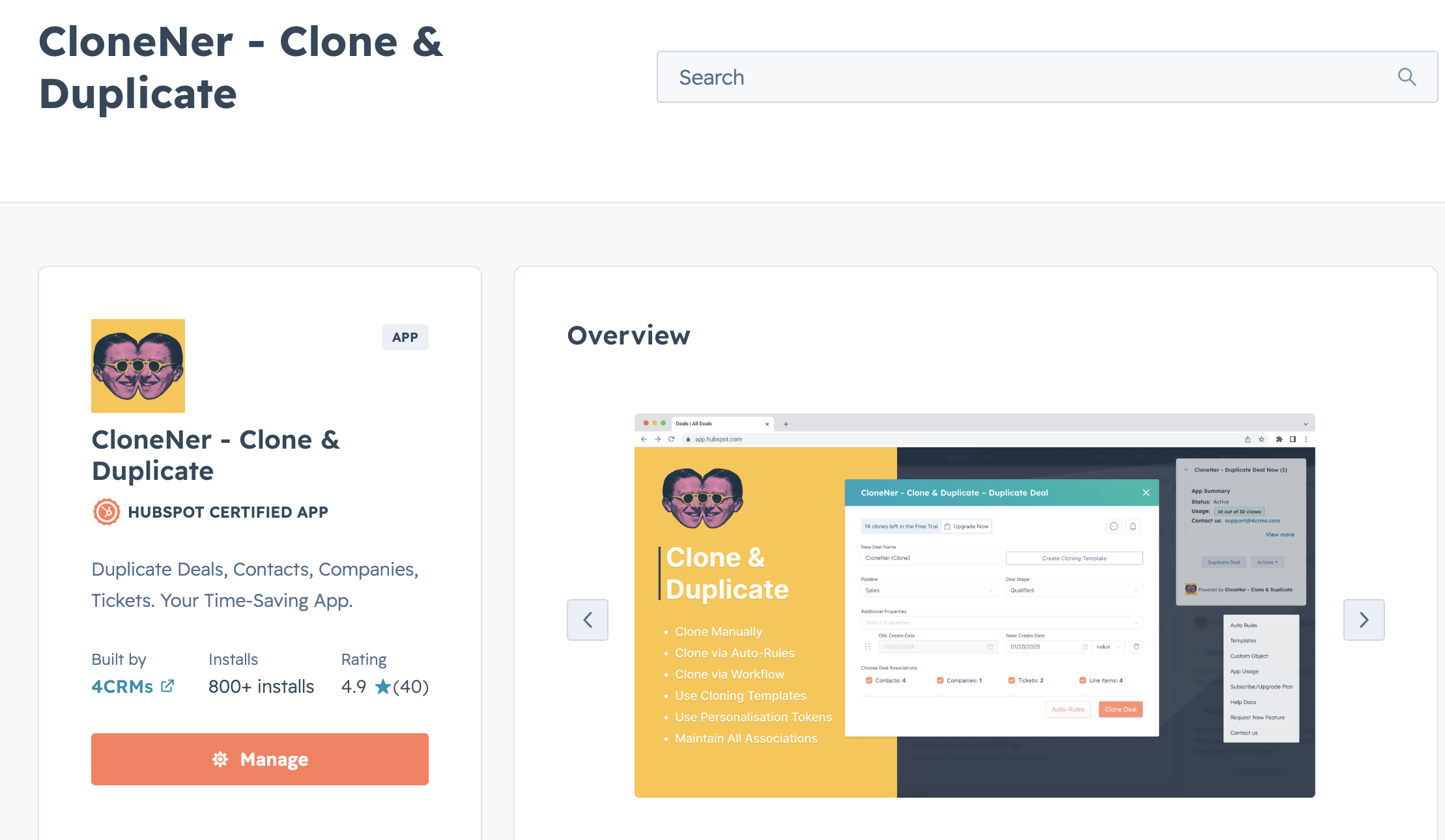
## **Native HubSpot record cloning: what it does well**
HubSpot includes a built-in **Clone** option on supported CRM records. This is useful when a user wants to create a new record that closely resembles an existing one without re-entering the same values manually.
In general, native cloning is a good fit when you want to:
- duplicate a **contact**, **company**, **deal**, or **ticket**,
- pre-fill standard property values,
- copy over supported associations,
- and create the new record manually from the original.
For simple use cases, this is a helpful time-saver. A sales rep can clone a deal structure, update a few values, and move on. A service team can duplicate a ticket framework for recurring requests. A CRM admin can reduce repetitive data entry across similar records.
## **The limitation of native cloning**
Native cloning is useful, but it’s still a **manual action**.
That matters because many teams don’t just want to clone records occasionally - they want cloning to happen as part of a repeatable process.
For example:
- when a deal reaches a certain stage,
- when a renewal should create a follow-up opportunity,
- when a support workflow needs to generate a structured child ticket,
- or when a business process depends on duplicating more than just basic fields.
This is where native cloning starts to fall short.
Native HubSpot cloning is best understood as a **record-level convenience feature**, not a full automation engine.
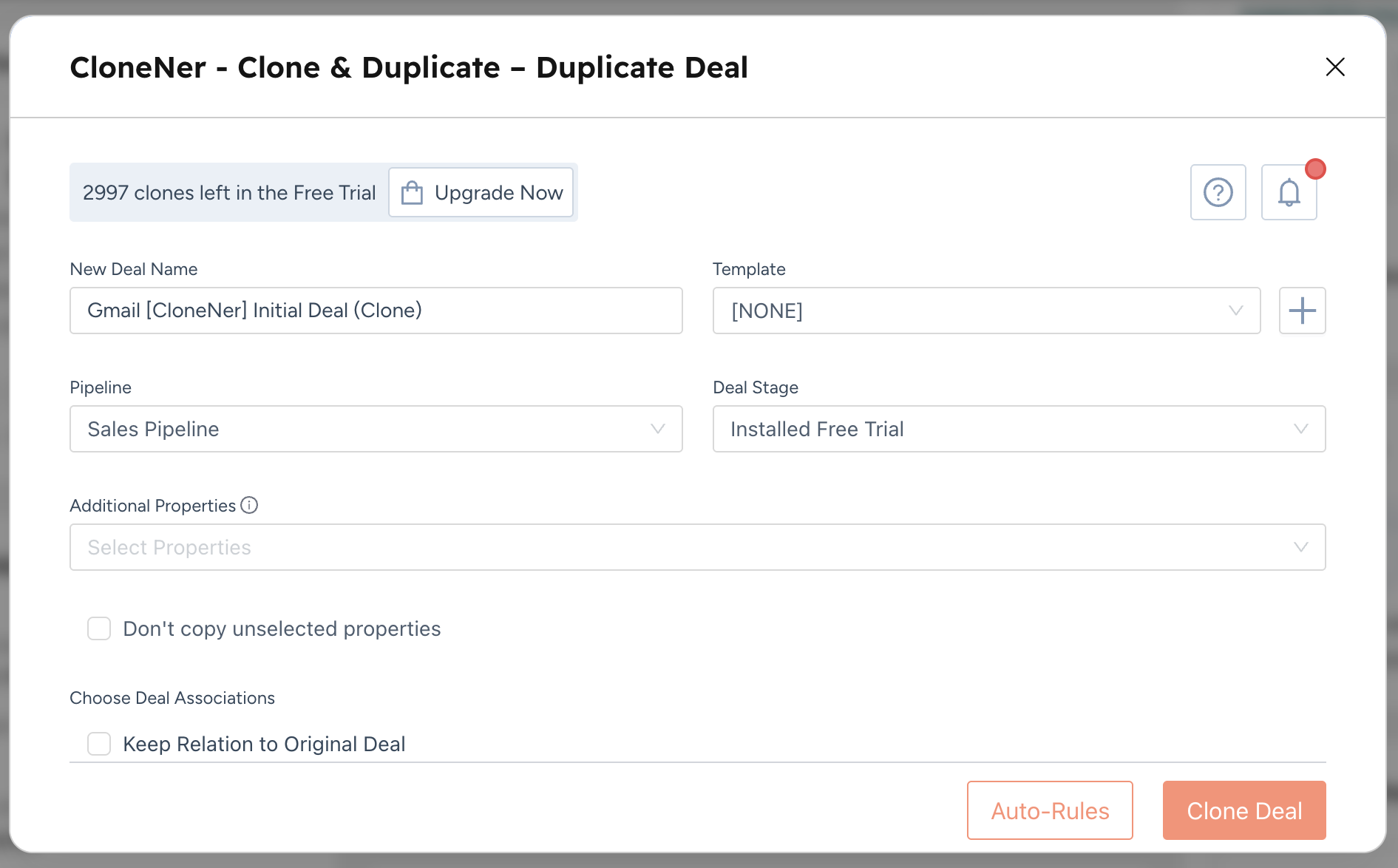
## **Can you clone records in HubSpot via workflow?**
Not natively.
HubSpot workflows can **create records**, and they can copy compatible property values into those newly created records. That means you can build something that behaves **like** a clone in certain scenarios.
For example, a workflow can:
- create a new deal, contact, company, or ticket,
- populate selected properties,
- associate the new record with the enrolled record,
- and carry over some related context.
But that is not the same thing as a true **Clone record** action.
Why? Because workflow-created records typically require you to define:
- which properties should be copied,
- which associations should be recreated,
- how owners should be assigned,
- and how related data should behave.
So while workflows can simulate duplication, they do not provide a native one-click “clone this record exactly the way I need” experience.
## **The real gap: advanced duplication and automation**
This is where many HubSpot teams run into friction.
They often need more than:
- a manual clone button, or
- a workflow that only creates a basic new record.
They need cloning that is:
- **repeatable**,
- **template-driven**,
- **workflow-triggered**,
- and capable of handling more complex record structures.
Typical examples include:
- recurring deals with the same setup,
- tickets that require repeated process frameworks,
- copied records with associated assets,
- records that need line items and downstream structure preserved,
- or internal teams that want consistent duplication rules across users.
When duplication becomes part of operations rather than an occasional manual step, native HubSpot tools usually need support from an app purpose-built for that workflow.
## **Where CloneNer fits**
**CloneNer** is designed to fill that gap.
Rather than stopping at basic record duplication, CloneNer extends cloning in HubSpot with more flexibility and automation. It is especially useful for agencies, consultants, and mid-market HubSpot teams that need structured duplication across repeatable CRM processes.
CloneNer is positioned as a way to:
- duplicate records more efficiently,
- control what gets cloned,
- reuse cloning setups,
- and trigger cloning through automation.
In practice, that means teams can move beyond “copy this record once” and toward “standardize how duplication works across the business.”
## **What makes CloneNer different from native HubSpot cloning?**
The main difference is control.
HubSpot’s native clone feature is good for quick manual duplication. CloneNer adds an automation layer for teams that need more precision.
That includes use cases such as:
- cloning through workflows,
- using reusable templates,
- applying pre-defined cloning logic,
- and supporting more advanced duplication behavior.
For businesses running repeatable sales, onboarding, fulfillment, or support motions, this becomes a significant operational advantage. Instead of relying on users to remember what should be copied each time, the duplication process can be standardized.

## **Can CloneNer work with workflows?**
Yes, and that is one of the most important differentiators.
If your requirement is specifically:
**“[Can I clone records through a workflow?](https://www.4crms.com/blog/cloning-autorules-vs-workflows)”** native HubSpot gets you only part of the way there.
CloneNer is intended to support **workflow-based cloning**, which gives teams a way to integrate duplication directly into automation logic rather than relying on manual action alone.
That matters when cloning should happen:
- automatically after a stage change,
- after meeting specific criteria,
- as part of a handoff process,
- or as a repeatable trigger in revenue or service operations.
In other words, CloneNer helps turn cloning from a user task into an automated system behavior.
## **Why this matters for CRM efficiency**
Cloning is not just a convenience feature. It is an operational efficiency tool.
When duplication is handled well, teams can:
- reduce manual data entry,
- improve consistency between records,
- lower user error,
- speed up repeatable processes,
- and build more scalable HubSpot operations.
When duplication is handled poorly, the opposite happens:
- users recreate records manually,
- key values are missed,
- associations are incomplete,
- and workflow consistency breaks down.
That is why many growing teams eventually move from “Can HubSpot clone records?” to “How do we make cloning reliable, repeatable, and automated?”
## **When to use native HubSpot cloning**
Use HubSpot’s native feature when:
- the duplication is manual,
- the user is working from a single record,
- the process is simple,
- and you do not need advanced automation.
This is often enough for:
- occasional deal duplication,
- quick ticket recreation,
- simple admin tasks,
- and low-volume operational work.
## **When to use workflows plus record creation**
Use workflows plus **Create record** when:
- you want to automate record creation,
- you only need selected fields copied,
- and the duplication logic is relatively controlled.
This works well when you are intentionally building a simplified “clone-like” process rather than requiring a full duplication engine.
## **When CloneNer is the better fit**
CloneNer is a stronger fit when:
- cloning needs to happen in workflows,
- teams need reusable duplication templates,
- associated data matters,
- repeatable operational logic matters,
- or HubSpot’s native clone feature is too limited for the process.
For agencies and advanced HubSpot users, this is usually the difference between a workaround and a scalable solution.
## **Final takeaway**
Yes, HubSpot can clone records - but mostly as a **manual native action**.
If you want to automate duplication through workflows, HubSpot alone usually requires a workaround using **Create record** and property copying. That can work for basic scenarios, but it is not true native workflow cloning.
If your requirement is more advanced - especially if you want **workflow-based cloning**, **reusable templates**, or more complete record duplication behavior - [**CloneNer**](https://app.hubspot.com/marketplace/39685994/listing/clonener-2156213) is the more capable option.
For teams trying to make HubSpot processes faster, cleaner, and easier to scale, that distinction matters.
Posted in:
- \# CloneNer
*Was* this *helpful?*

7 minutes read
In this article
%201.png)
Yaryna Bil
Hey! I\`m Yaryna, a Product Success Manager passionate about HubSpot and helping clients get the most out of our apps. I write about CRM structure, automation, and the small process improvements that remove friction and support long-term growth.

Left with any questions?
[Contact us](https://www.4crms.com/contact-us)

## *Explore* our trending *publications*
### [ \# FlowNer Follow-Up Automation for HubSpot Starter Clients: An Agency Playbook  October 06, 2026  12 min read](https://www.4crms.com/blog/follow-up-automation-for-hubspot-starter-clients-an-agency-playbook)
### [ \# Tips and Tricks CRM Trends 2027–2028: 9 Shifts for HubSpot and RevOps Teams  October 06, 2026  29 min read](https://www.4crms.com/blog/crm-trends-2027-2028)
### [ \# FlowNer HubSpot Sequence Automation: Enroll, Throttle, Unenroll  September 23, 2026  5 min read](https://www.4crms.com/blog/hubspot-sequence-automation-enroll-throttle-unenroll)
### [ \# Tips and Tricks Shared Inbox, Shared Noise: Fixing HubSpot's Missing Spam Layer  September 16, 2026  10 min read](https://www.4crms.com/blog/shared-inbox-shared-noise-fixing-hubspots-missing-spam-layer)
### [ \# FlowNer Sequences Without the Upgrade: How FlowNer Brings Automated Follow-Ups to HubSpot Starter  September 14, 2026  4 min read](https://www.4crms.com/blog/sequences-without-the-upgrade-how-flowner-brings-automated-follow-ups-to-hubspot-starter)
### [ \# FlowNer How Agencies Automate Sequence Enrollment Across Client Portals  August 27, 2026  6 min read](https://www.4crms.com/blog/how-agencies-automate-sequence-enrollment-across-client-portals)

Built to keep your organization secure

## Subscribe to our blog
Get the inside scoop on industry news, product updates, and emerging trends, empowering you to make more informed decisions and stay ahead of the curve.
[Contact us](https://www.4crms.com/contact-us)

- Apps
- [CloneNer](https://www.4crms.com/clonener)
- [LineNer](https://www.4crms.com/linener)
- [FlowNer](https://www.4crms.com/flowner)
- [Copy Line Items](https://www.4crms.com/copy-line-items-between-deals)
- [Notifyer](https://www.4crms.com/notifyer)
- [Data Bridge](https://www.4crms.com/data-bridge)
- [Contact Optimizer](https://www.4crms.com/contacts-optimizer)
- [Marketplace Apps reporter](https://www.4crms.com/hubspot-apps-reporter-old)
- Information
- [Security Policy](https://www.4crms.com/security-policy)
- [Privacy Policy](https://www.4crms.com/privacy-policy)
- [Cookie Policy](https://www.4crms.com/cookie-policy)
- [Refund Policy](https://www.4crms.com/refund-policy)
- [Terms of Service](https://www.4crms.com/terms-of-service)
- [SLA](https://www.4crms.com/service-level-agreement)
- [Status](https://4crms.hyperping.app/)
- Resources
- [Blog](https://www.4crms.com/blog)
- [Video Guides](https://www.4crms.com/help)
- [CloneNer Release Notes](https://www.4crms.com/clonener-app-release-notes)
- [LineNer Release Notes](https://www.4crms.com/linener-app-release-notes)
- Company
- [Contact us](https://www.4crms.com/contact-us)
- [About us](https://www.4crms.com/about-us)
- [Testimonials](https://www.4crms.com/testimonials)
- [Partnership](https://www.4crms.com/for-partners)
Follow us on
- [](https://www.linkedin.com/company/4crms/)
- [](https://www.youtube.com/@4CRMs)
Copyright 2026 © 4CRMs.
```json
{
"@context" : "https://schema.org",
"@type" : "BlogPosting",
"author" : {
"@type" : "Person",
"name" : "Yaryna Bil",
"url" : "https://www.4crms.com/blog/author/yaryna-bil"
},
"dateModified" : "2026-05-19T05:34:51.387Z",
"datePublished" : "2026-05-01T09:33:36.000Z",
"headline" : "5 Things HubSpot Clone Feature Can't Do and Why You Should Consider CloneNer",
"image" : [ "https://www.4crms.com/hubfs/beautiful-woman-dressed-formally-office.jpg" ],
"mainEntityOfPage" : {
"@id" : "https://www.4crms.com/blog/5-things-hubspot-clone-feature-cant-do-and-why-you-should-consider-clonener",
"@type" : "WebPage"
},
"publisher" : {
"@type" : "Organization",
"logo" : {
"@type" : "ImageObject",
"url" : "https://www.4crms.com/hubfs/forCRMS.svg"
}
}
}
```