
If you run a small company with 5 to 10 HubSpot users and want 5 different people to send automated sequence emails, the key question is simple: what will it cost, and what do you actually need to buy?
The short answer is this: if you want to enroll contacts into Sequences using Workflows automatically, HubSpot requires an Enterprise subscription for that workflow-based enrollment use case. And if you want emails to be sent from 5 different people, each sender must have their own paid Enterprise seat plus a connected personal inbox.
For a small team, that means your budgeting should be based on the number of actual senders, not just the total number of portal users.
Quick Answer: How Much Does It Cost Annually?
HubSpot lists Sales Hub Enterprise at $150/month, and that includes 1 sales seat. If your company wants 5 senders, you would need 5 Sales Hub Enterprise seats, which comes to $750/month and $9,000/year based on the current listed pricing.
Annual cost breakdown for 5 senders
- 1 Sales Hub Enterprise seat: $150/month = $1,800/year.
- 5 Sales Hub Enterprise seats: $750/month = $9,000/year.
That is the cleanest estimate for a small company that wants five different people to be available as workflow senders. This estimate is based on HubSpot’s currently listed product pricing and does not account for taxes, discounts, negotiated contract pricing, or other add-ons.
Why Small Companies Get Confused About Sequence Pricing
This is where many teams misread HubSpot’s packaging.
You can manually enroll contacts into sequences with qualifying seats, but automatic enrollment through workflows is different. HubSpot specifically states that workflow-based sequence enrollment requires a Sales Hub or Service Hub Enterprise subscription.
On top of that, only users with a paid Sales Hub or Service Hub Enterprise seat and a connected personal inbox can be selected as the sequence sender.
So if your company has:
- 10 total HubSpot users
- but only 5 people who need emails sent from their own inboxes
Then your cost model should be built around 5 senders = 5 paid Enterprise seats for this use case.
What HubSpot Requires Before You Can Automate Sequence Enrollment
Before a workflow can enroll contacts into a sequence, your setup has to meet a few requirements:
- Your account needs an Enterprise subscription for workflow-based sequence enrollment.
- The sender must have an assigned Sales or Service seat to use sequences.
- The sender must have a connected personal email inbox.
- The sequence must be shared with the selected sender.
- The sender must stay within HubSpot’s daily send limits or contacts will skip enrollment.
There are also operational limitations to keep in mind:
- A contact can only be in one sequence at a time.
- If the sequence used by the workflow is deleted, the workflow can no longer enroll contacts into it.
- Placeholder tokens are not recommended in workflow-triggered sequences because missing values can result in emails sending with placeholder text.
How to Enroll Contacts into a Sequence in HubSpot
There are two ways to think about enrollment:
- manual enrollment
- automated enrollment with workflows
For small companies, both matter. Manual enrollment is useful for one-off outreach, while workflow enrollment matters when you want to scale and consistency.
Manual enrollment steps
To manually enroll contacts into a sequence, go to Sequences or start from a contact record.
Basic process:
- Open Sequences.
- Choose the sequence you want to use.
- Click Enroll contacts.
- Select one or more contacts.
- Choose the start step, time zone, delays, and sender email.
- Start the sequence.
HubSpot also allows bulk enrollment from Contacts, lists, and records, but sequence permissions and send limits still apply.
When you’re customizing send timing for the first step, HubSpot lets you switch from “send now” to “send later.”
For teams doing list-based or bulk enrollment, the bulk enrollment option from Contacts is especially useful for segmented campaigns or follow-up after events.
How to Set Up a Workflow to Automatically Enroll Contacts into a Sequence
If your goal is true automation, this is the setup that matters most.
HubSpot says you can use contact-based workflows to automatically enroll and unenroll contacts from sequences. In the workflow editor, you add the Enroll in a sequence action, then configure the sequence and sender.
Step-by-step workflow setup
- Go to Workflows.
- Create a new contact-based workflow or edit an existing one.
- Set your enrollment trigger — for example:
- form submission
- page view
- contact property change
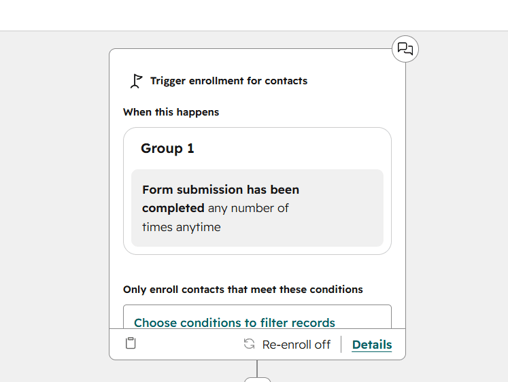
- Click the + icon to add an action.
- Search for Enroll in a sequence.
- Choose:
- the sequence
- the sender type
- the sender user or contact owner option
- optional time-zone handling
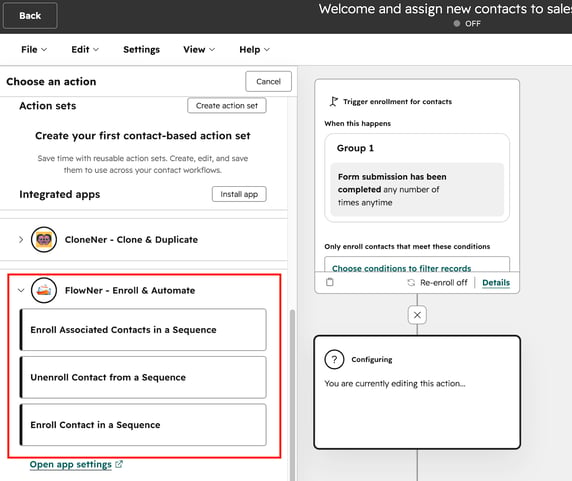
The workflow action itself looks like this in HubSpot, with options for sequence, sender, and email settings.
If you want to automate based on form submissions, HubSpot supports that directly from the sequence automation setup as well.
After you choose the trigger, you can configure the sequence action with the sender and optional delay settings.
Best Workflow Triggers for Small Companies
For a 5-to-10-user company, the most practical triggers are the ones tied to clear buyer intent. HubSpot documentation highlights examples like form submissions and page views for automated sequence enrollment.
The best options usually are:
1. Form submissions
Use this when someone requests a demo, downloads a high-intent asset, or submits a contact form.
2. Page views
Use this when someone repeatedly visits pricing pages, service pages, or comparison pages.
3. Lifecycle or qualification changes
If a contact becomes marketing qualified or sales qualified, a workflow can push them into the next outreach sequence.
For small businesses, the biggest mistake is automating too aggressively. HubSpot explicitly notes that automatic sequence enrollment is not recommended for recently imported cold leads, for non-personalized criteria like “create date is today,” or when you need to enroll more than 100 contacts in a broad, generic motion.
What the $9,000 Annual Cost Actually Buys a 5-Sender Team
If your company commits annually and needs 5 people to send automated sequence emails, the $9,000/year estimate gives you the core seat coverage for those five senders at HubSpot’s current listed Sales Hub Enterprise price.
That gives your sending team access to:
- Enterprise-level sales automation with the ability to trigger sequences via workflows.
- Up to 1,000 fully customizable workflows in Sales Hub Enterprise.
- Sequence functionality tied to each sender’s own inbox and permissions.
For a small company, that means the investment is less about “email sending” and more about building a repeatable outbound or follow-up engine that does not rely on manual enrollment every time.
Is It Worth It for a 5-to-10-User Business?
That depends on how important automation is to your sales process.
If only one person needs to send automated sequences, the cost is much lower. But if five different reps, founders, or salespeople need workflow-driven sequences from their own inboxes, then yes — the cost scales with the number of senders because HubSpot ties send capability to the actual user seat and inbox connection.
For many small teams, it is worth it when:
- leads must be routed quickly
- follow-up must happen automatically after demo requests
- multiple reps need outreach to come from their own inboxes
- consistency matters more than manual flexibility
It is usually less worthwhile when:
- only one person sends follow-up
- your lead volume is low
- manual enrollment is still manageable
- your team is not yet ready to build and maintain workflow logic
Final Takeaway
For a small company with 5 to 10 HubSpot users and 5 active senders, the practical annual budget for automatic sequence enrollment is $9,000 per year based on HubSpot’s current listed $150/month per Sales Hub Enterprise seat, with 1 seat included per subscription unit.
If you want to automatically enroll contacts into sequences, you need an Enterprise-level setup for the workflow use case.
And if you want emails to come from five different people, those five people each need to be eligible senders with their own paid seat and connected personal inbox.
In other words: for small teams, the true cost is not based on total headcount — it is based on the number of people who need to act as sequence senders.
________
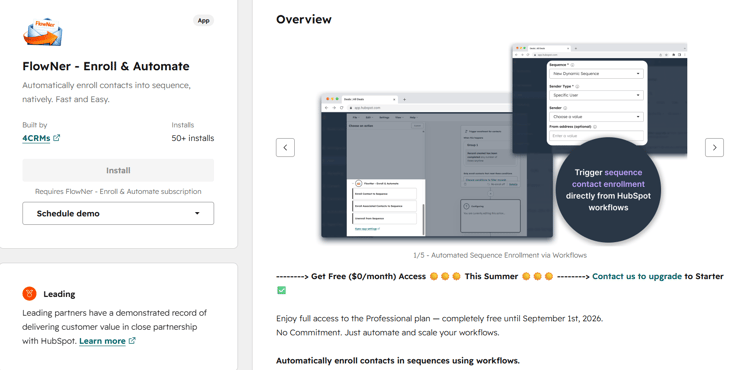
FlowNer makes contact enrollment in HubSpot sequences much easier by allowing teams to automate the process, rather than enrolling contacts manually one by one. It’s a practical option for businesses that want faster follow-up and more consistent outreach without stepping up to a more expensive setup.
At $29/month or $19/month billed annually, it’s a cost-effective way to add sequence automation without paying for multiple Enterprise seats.
👉 Try FlowNer and simplify your sequence enrollment process