

For RevOps professionals and Sales Leaders, the "Sequence Wall" is a familiar and costly frustration. You have built the perfect outreach or nurture sequence in HubSpot; your messaging is tight, your steps are logical, and your team is ready to hit the market. But then you hit the operational friction that stalls growth: manual enrollment.
In HubSpot Sales Professional, sequences are powerful but functionally "trapped." Unlike other HubSpot tools, they cannot be triggered via workflows natively. To get that "hands-off" automation, HubSpot recommends you toward Sales Hub Enterprise - a significant jump in cost that many growing teams aren't ready to absorb.
This guide explores how FlowNer provides a practical, high-performance alternative for automating sequences directly within your existing HubSpot Pro workflows. We will dive deep into the hidden costs of manual work, the technical architecture of workflow-driven sequences, and a new "Split Segment" feature designed to protect your deliverability.
The Reality of the "Manual Work Tax" in HubSpot
When lead volume is low, manual enrollment feels like a minor administrative task. But as you scale your RevOps, relying on a human to click "Enroll" for every prospect creates significant operational debt. This isn't just about lost time; it is about the erosion of your sales process integrity.
Why Manual Processes Fail at Scale
Manual work acts as a bottleneck that prevents your team from reaching their full revenue potential. Here is how the "manual tax" manifests in daily operations:
- The "Speed to Lead" Lag: Leads that arrive over the weekend or after hours sit idle until a manager manually triggers the sequence on Monday morning. In high-velocity sales environments, a 48-hour delay often means a lost opportunity to a faster, automated competitor.
- Human Error and Funnel Leaks: Sales reps are human. Under pressure, they prioritize "hot" leads and often forget to enroll the rest into long-term nurture sequences. This leads to a leaky funnel where potential revenue simply evaporates due to a lack of consistent follow-up.
- Wasted Administrative Hours: Every minute a rep spends navigating HubSpot menus to enroll contacts is a minute they aren't spent actually selling, researching their accounts, or building relationships.
- Inconsistent Data Mapping: When enrollment is manual, reps often choose the wrong sequence or the wrong "from" address, leading to a disjointed customer experience and poor reporting data for RevOps.
The Solution: Workflow-Driven Automation with FlowNer
FlowNer bridges the gap between Sales Pro and Enterprise. It functions as a Custom Action directly inside your standard HubSpot Workflows. Instead of assigning a manual task to a rep or forcing them to remember an enrollment step, you simply add a FlowNer step to your existing automation.
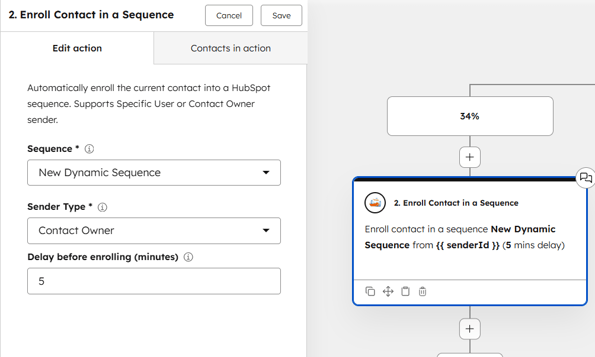
This is the ultimate HubSpot "hack" for teams that need Enterprise-level power on a Professional budget. Because it lives inside the workflow tool, you can trigger sequences based on any property change - Contact, Deal, Company, or Ticket.
Why Automated Enrollment Changes the Game
When you move from manual to automated enrollment, your CRM stops being a database and starts being an engine. You no longer hope your team follows the process; the process follows the data.
- Native Integration: FlowNer lives inside the workflow tool you already use. There is no new platform to learn, no separate login, and no complex API to manage.
- Flexible Triggers: You can trigger sequences based on a Deal reaching a certain amount, a Ticket being closed, or a Contact’s Lifecycle Stage changing to "Qualified."
- Dynamic Sender Logic: One of the biggest risks of automation is sounding like a robot. FlowNer allows the email to always come from the Contact Owner, maintaining the personal, human touch required for high-stakes B2B sales.
- Consistency at Scale: Whether you have 10 leads or 10,000, every single one receives the exact same high-quality follow-up without a single manual click.
High-Value Automation Use Cases for Sales and RevOps
To realize the true value of FlowNer, you must look at the specific workflows where manual work usually kills momentum.
1. Deal Stage Automation
When a Deal moves to "Discovery Scheduled," the clock starts ticking. You need to send prep materials or case studies to ensure the prospect is ready for the call. Instead of a rep remembering to do this, a Deal-based workflow can use FlowNer to enroll the primary contact into a "Discovery Prep" sequence the second the stage changes.
2. The "Closed Lost" Revival
Deals that go "Closed Lost" due to "Timing" or "Budget" are often moved to a static list and forgotten. This is a massive waste of previous effort. A workflow can be set to wait 90 days, then use FlowNer to enroll that contact into a "Checking In" sequence. This keeps your brand top-of-mind without any manual tracking or reminders.
3. Immediate Lead Nurturing
When a high-intent lead downloads a bottom-of-funnel asset, they are at their peak interest. Using FlowNer, you can immediately enroll them in a tailored outbound sequence from their assigned rep. This ensures the follow-up happens while your product is still fresh in their mind, significantly increasing conversion rates.
4. Account-Based Marketing (ABM) Plays
In complex B2B sales, you often deal with multiple stakeholders at a single company. You can set up a Company-based workflow that triggers when a "Target Account" reaches a specific engagement score. FlowNer can then enroll all associated contacts at that company into a coordinated multi-channel sequence, ensuring your message is consistent across the entire buying committee.
The "Segment Split" Advantage
Automation is a double-edged sword. If you automate 500 enrollments at the same time, you risk triggering spam filters. Modern Email Service Providers (ESPs) like Google and Outlook look for "burst" patterns as a sign of bot activity, which can devastate your domain's sender score.
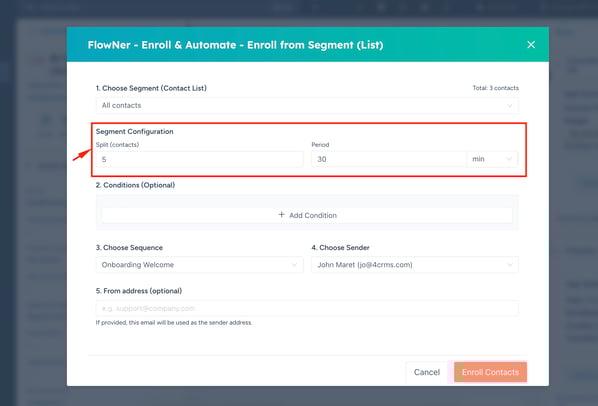
FlowNer's new Segment Configuration feature solves this by allowing you to stagger your automation.
How Staggered Enrollment Protects Your Revenue
Staggering your sequence enrollment is a critical deliverability strategy that is often overlooked in basic automation setups.
- Protects Domain Reputation: By breaking a large list into smaller, timed batches, your sending volume looks natural rather than automated. This prevents your domain from being blacklisted by major ESPs.
- Mimics Human Behavior: Staggered start times prevent the "blast" pattern that flags spam filters. It makes your automated outreach look like a human is sitting at their desk sending emails throughout the day.
- Optimized Open Rates: When emails are delivered in manageable batches, they are less likely to be flagged as "Promotions" or "Spam." Better deliverability leads directly to higher open rates and more booked meetings.
- Owner-Based Throttling: You can ensure that no single sales rep’s inbox exceeds safe sending limits in a single hour, protecting individual rep accounts from being flagged for suspicious activity.
Scalability Without Operational Friction
Scaling a sales team shouldn't mean scaling your administrative headcount. If your RevOps team is spending hours every week "managing sequences" or "checking enrollments," you aren't running an automated engine—you’re running a manual one with digital tools.
FlowNer allows you to keep the simplicity and cost-effectiveness of HubSpot Sales Professional while gaining the automation depth required for modern, global sales operations. Whether you are a HubSpot agency managing multiple portals or a startup founder looking to lean out your operations, the goal is the same: More automation. Less administration.
Implementing FlowNer in Your Workflow
Setting up this automation is straightforward. You don't need a developer or a complex integration platform like Zapier.
-
Define Your Enrollment Trigger in HubSpot Workflows
Create a standard HubSpot workflow based on the object you want to track (Contact, Deal, or Company). Set your criteria, such as "Lead Status = Qualified" or "Deal Stage = Contract Sent."
-
Add the FlowNer ActionSelect Custom Action
Click the "+" icon to add a new action, scroll to the bottom to find "FlowNer," and select "Enroll in Sequence."
-
Configure Sequence Settings: Choose Your Parameters
Select the specific sequence you want to trigger. Choose the "From" address (we recommend using the "Contact Owner" property for a personalized feel).
-
Enable Segment Splitting, Protect Deliverability
Use the new segment feature to split your enrollments into batches. Set your batch size and the time delay between segments to ensure your outreach looks natural to spam filters.
-
Review and Activate Go Live
Test your workflow with a few sample records to ensure the logic holds. Once verified, turn the workflow on and watch your manual enrollment tasks disappear.
Final Thoughts: The Future of HubSpot Productivity
The most successful companies on HubSpot aren't the ones with the largest budgets - they are the ones with the most efficient operations. By bridging the gap between Sales Pro and Sales Enterprise, FlowNer gives mid-market teams a competitive edge.
You can now automate the entire prospect lifecycle, from initial lead capture to "Closed Lost" revival, while maintaining the high deliverability and personalization of a manual process.
Ready to stop clicking "Enroll" and start closing deals? Explore FlowNer to see how you can automate your first sequence in under 10 minutes and join the ranks of high-performance RevOps teams.