

If you’re managing sales and support in HubSpot, you’ve probably felt this pain:
- Reps rebuilding the same deal structure over and over.
- CSMs and support agents recreating similar tickets for onboarding, escalations, or recurring reviews.
- Ops teams battling messy pipelines and inconsistent data because everyone sets things up “their own way.”
HubSpot’s native cloning is helpful, but it’s basic: you can clone a record one‑by‑one, and not everything you care about is copied. It’s not designed for templates, automation, or scale.
That’s where CloneNer comes in and is usefull even after HubSpot added basic Clone Deal feature.
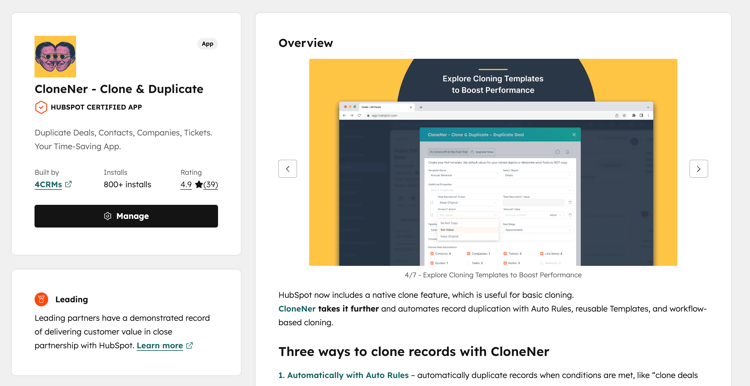
CloneNer is a HubSpot Certified app that helps you clone deals, tickets, contacts, companies, and custom objects - manually, via smart templates, or fully automated from rules and workflows. 1,500+ companies across 50+ countries already use it to remove repetitive work and clean up their processes.
In this article, we’ll walk through:
-
The most common HubSpot use cases for cloning deals and tickets
-
How CloneNer’s features (Auto‑Rules, Workflow actions, Templates, Custom Objects) solve real user needs
-
Concrete examples you can plug directly into your own HubSpot setup
Why HubSpot Teams Need Smarter Cloning
HubSpot users (especially RevOps, Sales Ops, and Service leaders) consistently run into the same challenges:
- Repetition: Creating similar deals/tickets with the same properties, line items, and routing logic.
- Inconsistency: Different people filling fields differently, breaking reports and automation.
- Limited native cloning: Native “Clone” is manual, one‑off, and doesn’t support rules, large‑scale automation, or flexible templates.
- Operational friction: Handoffs from Sales → CSM/PM → Support require manual creation of new records in the right pipelines.
CloneNer is built specifically to solve those pains for HubSpot users - without asking you to rebuild your processes from scratch.
Core Features of CloneNer (in Plain English)
Before diving into use cases, here’s what CloneNer actually does:
- Manual cloning with control: Duplicate deals, tickets, contacts, companies, and custom objects in a few clicks and choose which associations to keep.
- Cloning Templates: Turn your best‑configured deals and tickets into reusable templates your team can select from.
- Auto-Rules (IFTTT): Define “If This, Then That” rules to automatically clone records when certain conditions are met.
- HubSpot Workflow integration: Use CloneNer actions directly inside HubSpot workflows to trigger cloning as part of your automation.
- Custom object cloning: Duplicate custom objects and their key properties/associations—critical for advanced HubSpot setups.
- Line item support: Automatically carry over products and line items when duplicating deals, reducing pricing and quoting errors.
Now let’s connect those features to real, high‑value scenarios.
Use Case 1: Recurring and Renewal Deals (Sales & RevOps)
Problem:
Renewals and repeat orders are your revenue lifeblood - but they’re often managed with messy workarounds:
- Manual recreation of deals for each contract cycle
- Inconsistent products, terms, and internal flags
- Overcomplicated workflows trying (and failing) to build clean renewal records
How CloneNer helps:
- Clone closed‑won deals into new renewal deals
- Take last year’s closed‑won deal.
- Use CloneNer to clone it into the Renewal pipeline, with products, deal type, region, and other key fields in place.
- Reps only adjust dates, term length, and amounts.
- Automate renewals with Auto‑Rules (IFTTT)
- Set a rule: IF deal stage =
Closed won, THEN clone deal intoRenewal – Upcomingpipeline. - Or: IF “Contract End Date” is 90 days away, THEN trigger a workflow action that uses CloneNer to create a renewal deal.
- Set a rule: IF deal stage =
- Keep your renewal pipeline clean and accurate
- Each renewal cycle gets its own clean deal, with consistent properties.
- No more half‑baked deals created via generic workflows that miss crucial fields.
Benefits:
- Save time on every renewal
- Standardize deal structure across sales reps and regions
- Improve forecasting and reporting for renewals
Use Case 2: Post‑Deal Handoff to Delivery / PM / CSM
Problem:
Once a deal is won, the real work starts. Many teams:
- Manually recreate a new deal or ticket in a different pipeline
- Lose context or forget to bring over important fields
- Depend on ad‑hoc solutions to hand off from Sales to CSM or Project Management
How CloneNer helps:
- Auto-create delivery/implementation deals
- When a deal moves to
Closed won, automatically clone it into a PMO or Delivery pipeline. - Maintain associations (company, contacts, products) and essential properties.
- Change owner to your PM/CSM team.
- When a deal moves to
- Use CloneNer templates for different handoff flows
- Create templates like “Standard Implementation Deal”, “Enterprise Implementation Deal”, “Partner Led Delivery”.
- Reps (or workflows) clone the right template so every project starts with the same structure.
- Multi‑pipeline visibility
- Sales keeps the original deal.
- Delivery owns the cloned deal.
- Both share clean, consistent context.
Benefits:
- Smoother handoffs with no missing data
- Clear separation between “selling” and “delivering” pipelines
- Reduced friction between Sales, CSM, and PMO

Use Case 3: Structured Ticket Creation for Support & CS
Problem:
Tickets are often created in a rush:
- Agents manually select pipeline, stage, category, product, priority every time
- Data quality suffers, routing fails, and reporting becomes unreliable
- Repeated processes (onboarding, bug reports, cancellations) still start from scratch
How CloneNer helps:
- Define Ticket Templates for common scenarios
Examples:- “Onboarding – New Customer”
- “Bug – Critical Severity”
- “Account Review / QBR”
- “Cancellation – Save Attempt”
- Pipeline & stage
- Priority & SLA class
- Category/subcategory
- Product area
- Queue/team assignment
- Enable agents to clone, not configure
- Instead of building each ticket manually, agents pick a template and clone it.
- They just change customer‑specific details and notes.
- Automate ticket creation with Workflows & Auto‑Rules
- Lifecycle stage changes, CSAT drops, or NPS feedback can trigger a workflow that uses CloneNer to create a follow‑up ticket type (e.g., escalation, “churn risk review,” or “save play”).
- No one needs to remember to create the right ticket type—HubSpot and CloneNer handle it together.
Benefits:
- Faster ticket creation and routing
- Cleaner data across support pipelines
- Repeatable, predictable service processes
Use Case 4: Multi‑Team and Multi‑Step Support Processes
Problem:
One customer issue can involve multiple internal teams (Support, Engineering, Billing, CSM). Without structure:
- Agents manually create multiple tickets
- Context gets lost across teams
- There’s no standard way to represent multi‑step issues
How CloneNer helps:
- Clone tickets for each team in the chain
- Start from a master ticket with all customer context.
- Clone a version for Engineering, one for Billing, one for CSM—each with the same core details but different owners, queues, or priorities.
- Use Auto‑Rules to create escalation tickets
- IF ticket moves to
Escalated, THEN clone a ticket into the “Tier 2” or “Engineering” pipeline. - Ensure every escalation ticket has the same structure, fields, and tags.
- IF ticket moves to
- Retain a complete history
- All cloned tickets remain associated to the same company/contact, giving you a complete view of the case from multiple teams.
Benefits:
- Better cross‑team coordination
- Repeatable escalation flows
- Full context preserved from first touch to resolution
Use Case 5: Complex Custom Objects & Advanced Setups
Many advanced HubSpot portals rely on custom objects: projects, subscriptions, events, assets, you name it. Historically, these were tedious to replicate.
How CloneNer helps:
- Duplicate custom objects along with their key properties and associations.
- Scale usage of custom objects without manually recreating structure each time.
- Combine with Auto‑Rules and workflows to automatically spin up custom object records when deals or tickets hit specific conditions.
Benefits:
- Operational efficiency for complex data models
- Less manual setup for implementation, onboarding, events, programs, etc.
- Consistent structure across thousands of custom object records
Auto-Rules (IFTTT): Cloning That Runs Itself
CloneNer’s Auto-Rules give you “If This, Then That” automation specifically for duplication.
Examples you can implement:
- Deals
- IF deal stage =
Closed won→ clone intoRenewalpipeline. - IF property “Deal Type” =
Implementation→ clone into Implementation pipeline with a specific owner.
- IF deal stage =
- Tickets
- IF ticket priority changes to
High→ clone a ticket into the Escalation pipeline. - IF ticket reason =
Churn risk→ clone a ticket for the CSM team.
- IF ticket priority changes to
This is where CloneNer goes far beyond native cloning: you’re not just clicking “Clone” occasionally—you’re building cloning into your core process design.
Clone via HubSpot Workflows: Deep Integration with Automation
Because CloneNer integrates directly with HubSpot Workflows, you can:
- Trigger cloning from any workflow trigger HubSpot supports (form submissions, lifecycle changes, date‑based triggers, etc.).
- Chain cloning with other actions like emails, tasks, property updates, and webhooks.
- Build robust automation around renewals, projects, handoffs, and escalations.
This is ideal for RevOps and Service Ops teams that want cloning to be a first‑class part of their automation stack, not a manual “nice to have.”
Cloning Templates: Turn Best Practices into Clicks
Templates are the bridge between process design and everyday user behavior.
With CloneNer templates you can:
- Create “golden records” for:
- Standard deal types (Implementation, Renewal, Upsell, Partner)
- Standard ticket types (Onboarding, Bug, QBR, Cancellation, Feature request)
- Control exactly which properties and associations are cloned.
- Make it simple for frontline users to do the right thing, the right way, every time.
Instead of writing long process docs, you give your team a menu of templates. They choose, click, and go.
Why HubSpot Users Love CloneNer
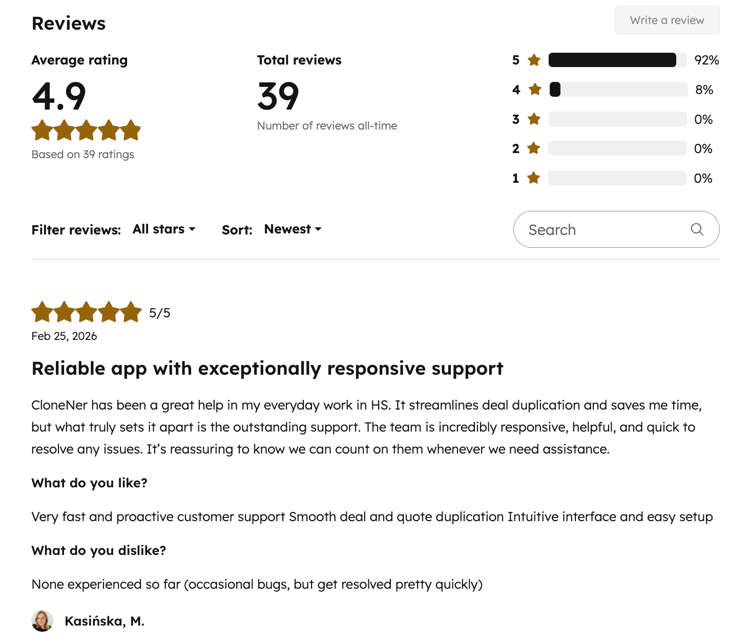
From what customers say, a few themes stand out:
- Time saver: Teams stop rebuilding the same records and instead get to spend time selling or serving customers.
- Error prevention: Automated logic and templates drastically reduce data entry mistakes and misconfigured deals/tickets.
- Easy to use: Users consistently mention the intuitive interface and smooth integration with HubSpot.
- Fills real HubSpot gaps: From line items to complex handoffs, CloneNer covers scenarios that native tooling can’t do elegantly.
- Scales with you: Whether you’re cloning one record or hundreds, the same simple setup works.
Plans That Grow with Your Team
CloneNer offers plans from Free to Professional, with:
- Secure HubSpot integration
- Unlimited users
- Cloning across deals, tickets, contacts, companies, and custom objects
- The ability to clone using templates and across pipelines/stages
The Free plan is enough to test‑drive key features (manual clones, auto‑rules, workflows) so you can prove value before scaling up.
Final Thoughts: Clone Smarter, Work Faster in HubSpot
If your team is:
- Creating recurring or renewal deals
- Handing off from Sales to CSM/PMO
- Running complex service processes across multiple teams
- Relying on custom objects to model your business
…then smarter cloning isn’t a “nice to have” - it’s a multiplier for everything you already do in HubSpot.
CloneNer is built to make that cloning fast, accurate, and automated:
- Auto-Rules for “If This, Then That” duplication
- Deep HubSpot Workflow integration
- Powerful templates for deals, tickets, and custom objects
- Proven at scale by HubSpot customers around the world
If you’re ready to stop rebuilding records from scratch and start scaling clean, consistent processes, CloneNer is the next logical step in your HubSpot stack.
You can try CloneNer for free and see the impact on your deals and tickets in just a few days.