
For teams working inside HubSpot, sequences are one of the most practical tools for outbound sales.
They help structure follow-ups, standardize messaging, and ensure consistent communication across every contact. Whether you are running cold outreach, re-engaging inactive leads, or working through inbound demand, sequences are where a significant part of pipeline generation happens.
But once you try to scale, a limitation becomes obvious.
In HubSpot Sales Professional, there is no native way to control how many contacts are enrolled into a sequence over time.
That creates a real operational challenge.
You either:
- enroll contacts manually one by one
- enroll large batches all at once
- or try to manage timing manually
None of these approaches supports controlled, scalable outreach.
The Real Problem with Sequence Enrollment
-
At a small scale, manual enrollment works.
But as soon as you start working with larger segments, the lack of control becomes risky.
If you enroll hundreds or thousands of contacts at once:
- email volume spikes immediately
- sending patterns look unnatural
- deliverability can suffer
On the other hand, if you try to control this manually:
- it takes time
- it is inconsistent
- it does not scale
This creates a gap between having a well-defined segment and actually executing outreach in a controlled way.
Why Enrollment Volume Control Matters?
Controlling enrollment is not just about organization. It directly impacts performance.
Email providers monitor how your sending volume changes over time. Sudden spikes can trigger spam filters, lower your domain reputation, and reduce inbox placement.
This is especially important when:
- starting outreach from a new domain
- reactivating an inactive email account
- launching a new outbound campaign
Consistency matters more than volume.
From an operational perspective, uncontrolled enrollment also affects your team. If too many contacts are enrolled at once, follow-ups become difficult to manage, personalization drops, and response quality decreases.
What is the "Sequence Throttling" Feature?
Sequence throttling is the ability to control how many contacts are enrolled into a sequence within a defined time interval. Instead of enrolling all contacts instantly, you define a pacing rule.
For example:
- 10 contacts per minute
- 40 contacts per hour
- 250 contacts per day
This creates a steady, predictable flow of outreach. Instead of spikes, you get consistency.
How FlowNer - Enroll and Automate Handles Enrollment
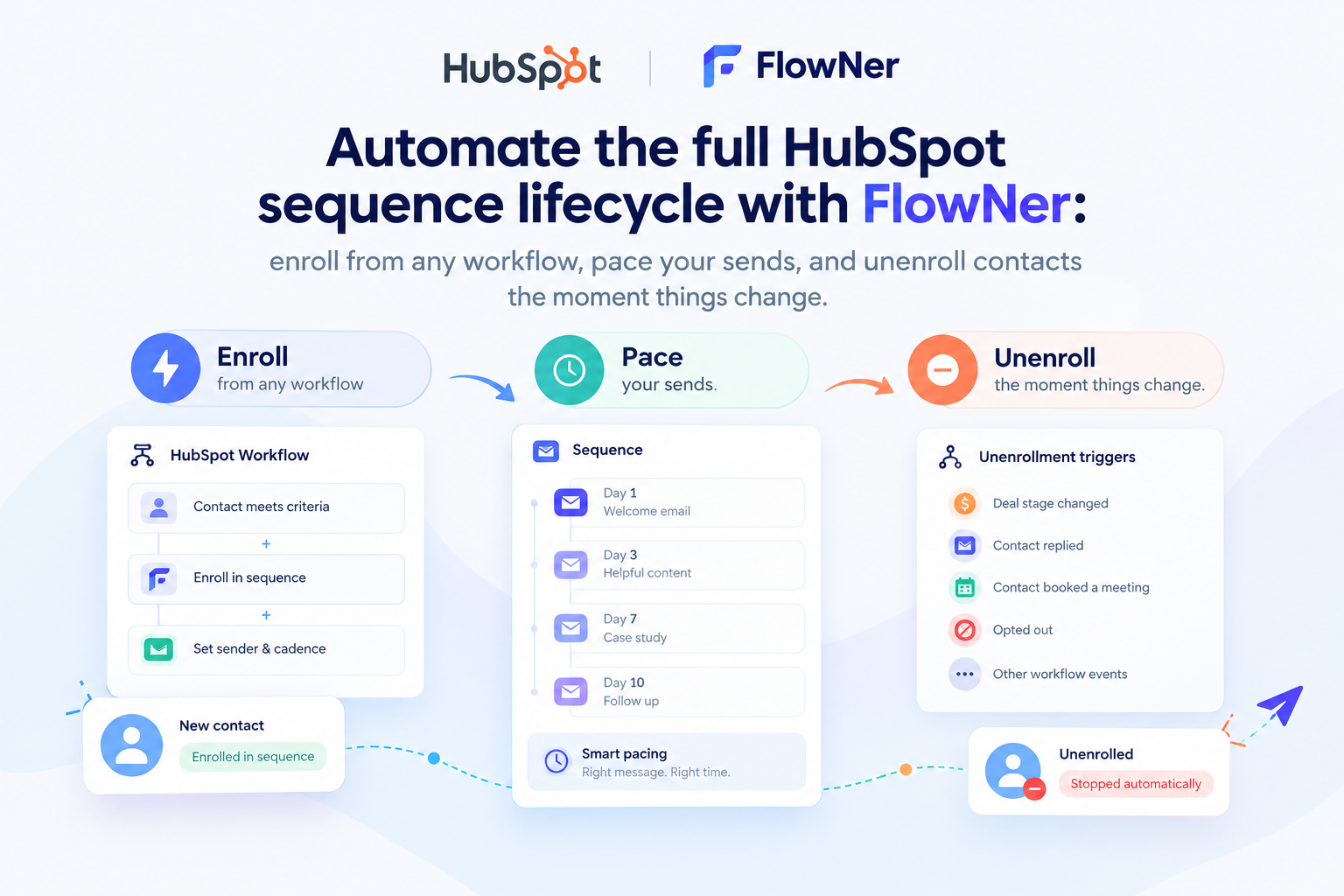
With FlowNer - Enroll and Automate, sequence enrollment is managed directly from contact lists.
Instead of relying on workflows, you initiate enrollment from the interface.
You open a contact in HubSpot, access the FlowNer card, and select “Enroll contacts from list.”
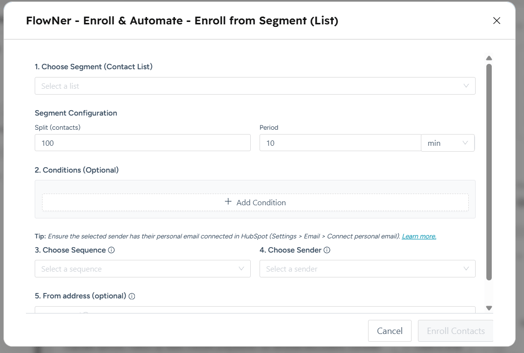
From there, you configure how the entire segment should be processed. This turns sequence enrollment into a structured operation rather than a manual task.
How Enrollment is Configured?
When enrolling contacts from a list, all key parameters are defined in one place.
You can:
- select the contact list that acts as your segment
- define how many contacts should be enrolled (split segment)
- choose the pacing interval - per minute, hour, or day
- apply conditions to filter which contacts are eligible
- select the sender (HubSpot user)
- define the sending email address
This setup allows you to control both targeting and volume without splitting lists or managing timing manually.
How Controlled Enrollment Works in Practice
Once configured, FlowNer processes the list gradually.
Instead of enrolling all contacts at once, the system:
- takes contacts from the selected list
- applies your conditions
- enrolls them in batches based on your limits
- continues until the segment is processed
This creates a predictable and stable outreach flow.
Practical Use Cases for HubSpot Teams
Warming up a sending domain
If you are starting outbound from a new domain, sending volume needs to increase gradually.
You can:
- start with a small number of enrollments per hour
- increase volume over time
- monitor engagement metrics
This helps build a healthy sending reputation.
Scaling outbound campaigns
If you have a large contact list, enrolling everyone at once can create risk.
With controlled enrollment:
- you distribute outreach across multiple days
- maintain consistent daily volume
- avoid sudden spikes
This keeps performance stable.
Working with segmented lists
For example, if you have a list of MQLs or campaign-specific contacts:
- you select the list
- apply additional conditions if needed
- control how fast contacts enter the sequence
This removes the need for manual batching.
Managing SDR workload
Enrollment volume directly affects how sales reps operate.
By controlling pacing:
- workload stays manageable
- follow-ups remain consistent
- personalization quality stays high
Step-by-Step Setup of FlowNer Sequence Throttling
Here is how the process of enrolling contacts into a segment works in practice.
- Open any contact in HubSpot
- Navigate to the FlowNer card
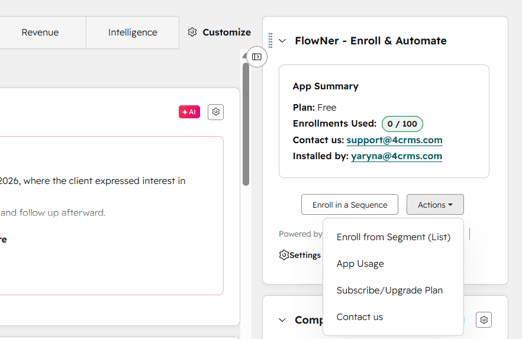
- Click “Enroll contacts from Segment (List)”
.png?width=460&height=322&name=image%20(14).png)
- Select your contact list (Segment)
- Configure:
- number of contacts (split by count)
- time interval (minute, hour, day)
- conditions (optional)
- sender and email address
- Confirm enrolment by pressing "Entoll Contacts"
Once started, the system processes contacts automatically based on your configuration.
Best Practices for Controlled Enrollment
Start with lower limits and increase gradually as you monitor performance. Track key metrics such as open rates, reply rates, and bounce rates to understand how your outreach is performing. Align your pacing with your sending setup, including domain age and inbox health. Avoid sudden volume increases, even if performance looks strong. Coordinate multiple campaigns to ensure total sending volume remains consistent.
Why This Approach Works Better Than Manual Enrollment
Manual enrollment does not scale.
It forces teams to:
- split lists manually
- track timing externally
- rely on human execution
This introduces inconsistency and limits growth.
With controlled list-based enrollment:
- everything is configured once
- execution is consistent
- volume is predictable
This makes outbound more structured and easier to manage.
Final Thoughts
For most HubSpot teams, the challenge is not building sequences. It is controlling how they are used at scale. Sequence throttling introduces a layer of control that makes outreach more predictable, protects deliverability, and improves team efficiency. By managing enrollment directly from contact lists, you move from manual execution to a structured system.
FlowNer - Enroll and Automate makes this possible without changing how your team already works in HubSpot. Instead of choosing between speed and safety, you get both.
FAQs
What is sequence throttling in HubSpot?
Sequence throttling is the ability to control how many contacts are enrolled into a sequence over a defined period of time.
Instead of enrolling all contacts at once, you spread enrollment across minutes, hours, or days. This helps maintain consistent sending volume and reduces the risk of deliverability issues.
Does HubSpot have native sequence throttling?
No, HubSpot does not currently provide built-in controls to limit how many contacts are enrolled into sequences over time.
Users can enroll contacts manually or in bulk, but there is no native way to pace enrollment automatically.
How is this different from workflows?
Workflows in HubSpot are designed for automation based on triggers and actions.
However, sequence enrollment is not built for controlled pacing through workflows. You cannot define how many contacts should enter a sequence per minute, hour, or day using native functionality.
FlowNer - Enroll and Automate approaches this differently by allowing enrollment directly from contact lists with defined limits.
How do I enroll contacts using FlowNer - Enroll and Automate?
You start from a contact record inside HubSpot. From there:
- open the FlowNer card
- click “Enroll contacts from list”
- select your contact list
- configure enrollment settings
This includes volume, timing, conditions, sender, and email address.
Can I control how fast contacts are enrolled?
Yes. You can define pacing rules such as:
- contacts per minute
- contacts per hour
- contacts per day
This allows you to match your sending volume to your deliverability strategy.
Can I apply filters or conditions before enrollment?
Yes. Before contacts are enrolled, you can define conditions to filter which records should be included.
This ensures that only relevant and qualified contacts enter your sequence.
Is this useful for cold email outreach?
Yes, especially for cold outreach.
Controlled enrollment helps:
- avoid sudden spikes in sending
- maintain a natural sending pattern
- protect your domain reputation
This is critical when working with new or warming inboxes.
Can I use this for email warm-up?
Yes. You can start with low enrollment limits and gradually increase volume over time.
This helps establish a stable sending reputation without overwhelming inbox providers.
What happens after I start enrollment?
Once configured, FlowNer - Enroll and Automate processes your list automatically.
Contacts are enrolled in batches based on your defined pacing until the list is completed.
Do I need to split my lists manually?
No. You can use a single contact list and control how it is processed using pacing settings.
This removes the need for manual batching or scheduling.
Can I control which sender is used?
Yes.
You can select the sender (HubSpot user) and define the email address used for sending as part of the enrollment setup.
Is this suitable for large contact lists?
Yes. In fact, this is where controlled enrollment provides the most value.
Instead of enrolling thousands of contacts at once, you can distribute outreach over time while keeping full control over volume and quality.