
RevOps, Sales Ops, and Service leaders run into the same three problems in HubSpot: repetition (rebuilding the same record structure every week), inconsistency (different people filling fields differently, which breaks reports), and limited native cloning (HubSpot's built-in "Clone" is manual, one-off, and doesn't scale). CloneNer was built to solve exactly this - but solving it well means picking the right object for HubSpot process automation in the first place, and not every object is a good fit.
HubSpot has plenty of objects to work with - Projects, Tickets, Services, Deals, custom objects - and not all of them are worth automating the same way. Clone the wrong things, and you just end up with more clutter to manage: duplicate records nobody follows up on, orphaned tasks, a pipeline that looks busier than it actually is.
Here's a filter that actually helps. Ask these questions about the object you're considering:
- Does it repeat often, or is this a one-off?
- Does it have real structure - properties, stages, associations - or is it basically just a name and an owner?
- Does it drag other records along with it, like Tasks or line items?
- Do dates need to shift every time it's reused (kickoff dates, due dates, SLA clocks)?
Hit most of those, and cloning pays off fast. Hit one or two, and a plain template does the job just fine - you don't need a full automation for something you touch twice a quarter.
Projects
Projects are the clearest case. They come with pipelines, stages, custom properties, Tasks, and links to Contacts, Companies, and Deals - which is exactly why rebuilding one by hand is so painful. Miss a Task and an onboarding step quietly disappears. Get a due date wrong and your delivery timeline is off before work even starts.
Picture a typical client onboarding: kickoff call, account setup, data migration, training session, handoff to the account manager. Five stages, each with its own Tasks and owners. Do that manually for every new client and someone's rebuilding the same five-step structure by hand every single time - retyping the same task names, resetting the same due dates, reattaching the same associations. It's slow, and it's exactly the kind of work where a copy-paste error costs you a missed deadline three weeks later.
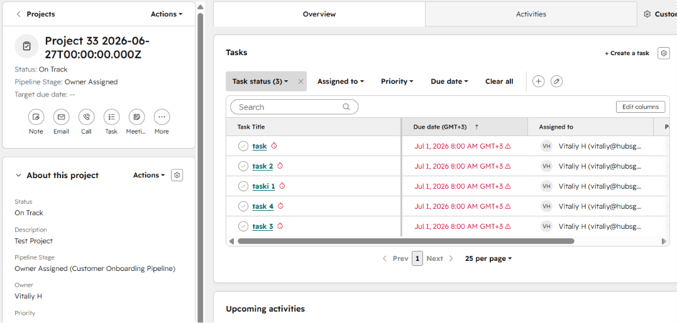
That's why onboarding, implementation, and repeated client work fit Projects so well. A cloned template with Tasks already attached and dates already shifted turns a 45-minute setup into a 5-minute check - you review it, adjust anything client-specific, and launch. Worth knowing: HubSpot's native "Clone" on a project doesn't bring the tasks or subtasks with it at all, it just duplicates the shell - you can read more about that here.
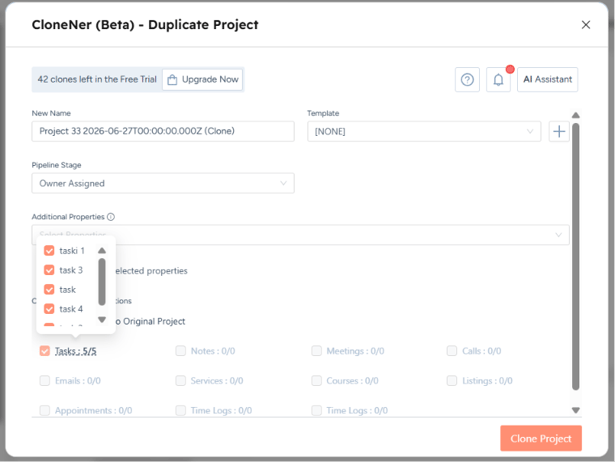
If you automate cloning for one object, make it this one. It's what CloneNer was built around first.
Tickets
When people weigh HubSpot Projects vs Tickets for cloning, the difference comes down to scale. Tickets are a lighter case. They're built for single issues, not full workflows, so the cloning story here is narrower - but it's real when the same request type keeps showing up: recurring maintenance tickets, standard onboarding for new accounts, a fixed intake flow your support team runs constantly.
Say your service team handles quarterly maintenance checks for every client account. Same ticket type, same checklist of properties, same associated Tasks for the technician. That's a good candidate. A one-off billing dispute that needs its own investigation? Not so much - there's nothing repeatable to clone.
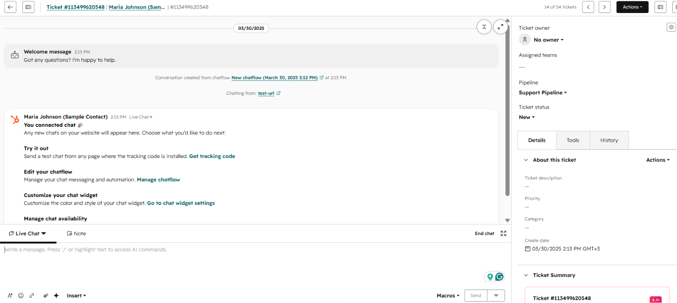
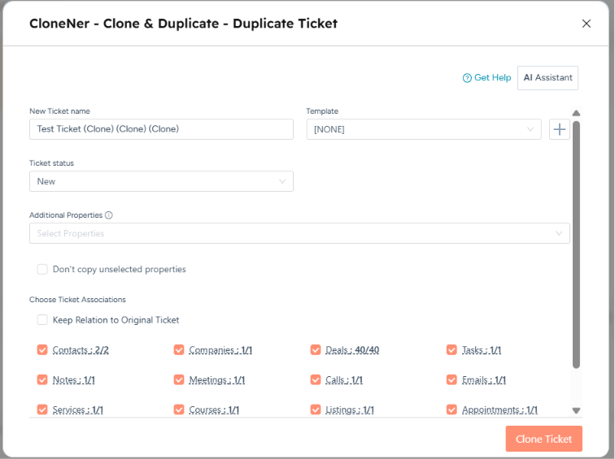
The mistake with Tickets is cloning too much. Old activity, resolved notes, closed-ticket context - none of that should follow a fresh case. Dragging forward a resolved complaint into a brand-new ticket confuses whoever picks it up next. What should travel is the shape: ticket type, relevant properties, the right associations, and any standard intake Tasks.
CloneNer lets you choose exactly which properties and Tasks come along, so history stays where it belongs - we go deeper on this in another article.
Services
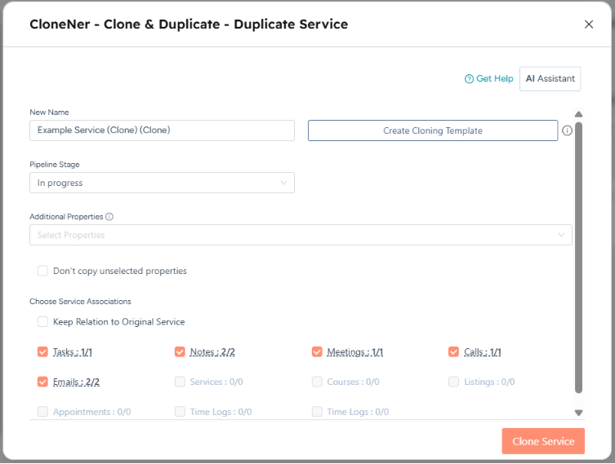
Of all the HubSpot service delivery objects, Services is the one people overlook most. It's worth checking if you run retainer work or recurring engagements with defined deliverables. It comes down to whether your engagements actually repeat - same retainer structure, different client. An agency selling a fixed "SEO retainer" package with the same three deliverables every month is a good fit. A consultancy where every engagement is scoped from scratch isn't - there's nothing standard to clone.
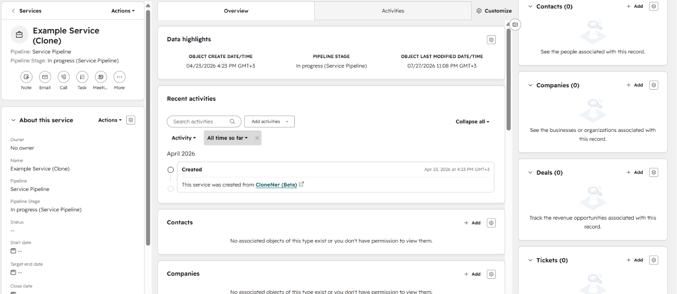
If every engagement your team runs looks meaningfully different, skip this one and don't force it.
If it does apply, CloneNer carries the Service structure and deliverables into every new engagement, so you're not rebuilding the same package definition from memory each time you sign a new client.
Custom objects
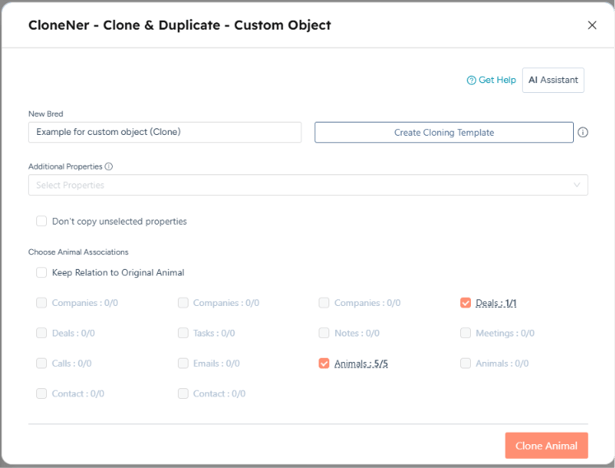
These are the wildcard, because they're built for your process specifically. Among hubspot custom objects use cases, cloning tends to matter most for recurring audits or compliance checklists - a custom object like that can be just as strong a candidate as Projects, sometimes stronger, because it's shaped around exactly your repeatable process instead of a generic pipeline.
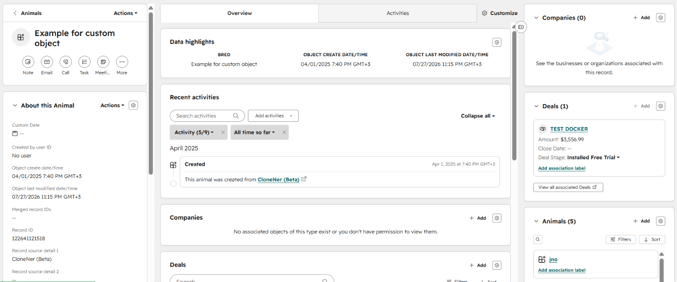
Think of a compliance-heavy business running the same audit structure every quarter, or an agency with a custom "Campaign" object it uses instead of Projects. Same filter applies: does it repeat, does it carry Tasks, do dates matter? Don't treat it as an afterthought just because it isn't native - if it hits the same marks as Projects, it deserves the same treatment.
CloneNer clones custom objects the same way it clones Projects, so you're not stuck writing custom code just because HubSpot didn't build the object for you - see how it works in this article.
What about Deals?
Cloning Deals just to save on data entry usually backfires - duplicate opportunities, messy pipeline reporting, a forecast that's suddenly wrong because there are two "Acme Corp - Renewal" deals sitting in the pipeline. There are legitimate reasons to clone one though: moving a deal between pipelines as it changes stage of ownership, or duplicating a batch of historical deals during a restructure so old data doesn't get lost - there's a full breakdown of when it's worth it here.
Where to start
- Onboarding/implementation teams: Projects, easily.
- Support teams: Tickets, for recurring request types - structure only, not history.
- Agencies on retainers: Services, if your packages are actually standardized.
- Anyone with industry-specific processes: check your custom objects the same way you'd check Projects.
Start with whatever your team rebuilds most often. Get that one right before touching anything else.
CloneNer clones Projects, Tickets, and custom objects - properties, Tasks, and due dates included - in a few clicks instead of a manual rebuild. New to it? Start with the CloneNer Setup Guide.

FAQ
Which HubSpot object is the best candidate for cloning?
Projects, in most cases. They combine pipelines, stages, properties, and Tasks in one structure, so cloning saves the most time and cuts the most room for error.
Should I clone Tickets with their full history?
No. Clone the ticket type, properties, and associations, but leave old activity and resolved notes behind - they belong to the original issue, not the new one.
Is it worth cloning Deals?
Rarely, just to save on data entry. It's more useful for specific cases, like moving a deal between pipelines or duplicating historical deals during a restructure.
Can custom objects be cloned the same way as Projects?
Yes, as long as the object has real structure - properties, associations, related Tasks. If it hits those marks, treat it the same way you'd treat a Project.
Does HubSpot's native "Clone" copy Tasks along with a Project?
No. Native cloning duplicates the project record only - the tasks and subtasks stay behind, which is one of the main reasons teams look for a dedicated cloning app.