
Every HubSpot portal an agency manages is its own separate instance. There is no shared automation layer between a client on Sales Hub Professional and another client on Sales Hub Enterprise, so any sequence-enrollment logic built in one account has to be rebuilt, by hand, in every other account. For an agency running ten or twenty client portals, that adds up to the same workflow being recreated over and over, with small inconsistencies creeping in each time.
The friction shows up in a specific place. HubSpot lets you enroll and unenroll contacts from a sequence through workflows, but that workflow action is gated to Sales Hub or Service Hub Enterprise. Most agency clients sit on Professional. So the agency team either enrolls contacts into sequences manually, client by client, or pushes for an Enterprise upgrade the client didn't ask for and doesn't necessarily need for anything else. Neither option scales cleanly across a portfolio of accounts.
Where the inconsistency comes from
This isn't a HubSpot product gap so much as a process problem that agencies inherit by working across many portals at once. A few patterns show up repeatedly:
- The trigger logic for enrolling contacts (deal stage, lead source, lifecycle stage change) gets defined slightly differently in each portal, because it's rebuilt from memory instead of from a shared template.
- Unenrollment rules are the first thing to get skipped under time pressure, since they take an extra workflow to set up correctly, so contacts keep receiving sequence emails after a deal closes or a lead disqualifies.
- Sender assignment is hardcoded to one rep instead of tied to the contact owner, which breaks the moment account ownership changes or a new client is onboarded with a different team structure.
- Nobody documents which client portals have the automation live and which are still running sequences manually, so audits take longer than the original setup did.
What FlowNer changes
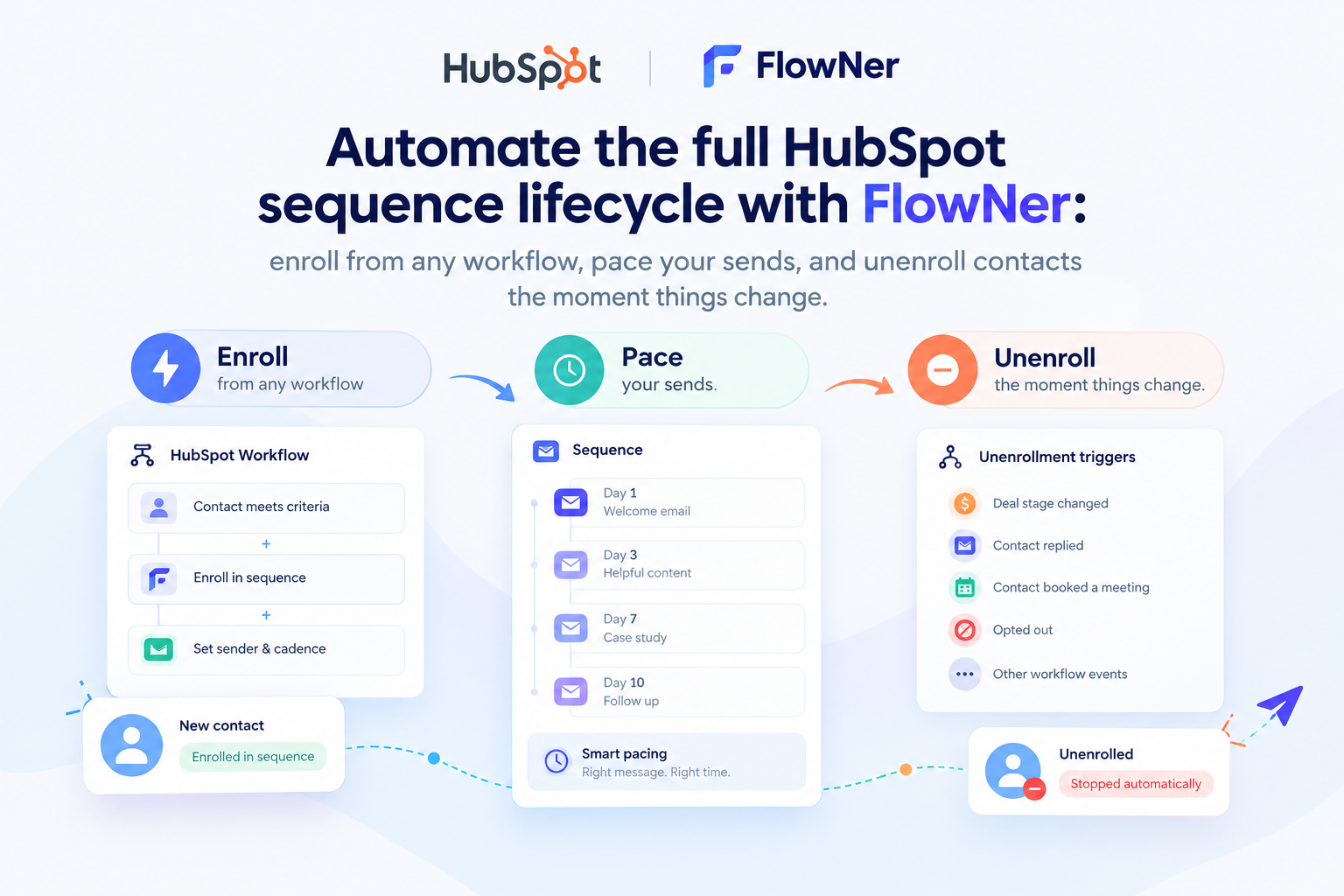
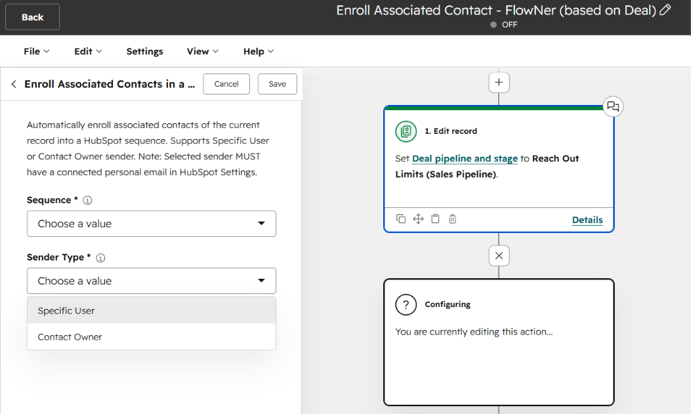
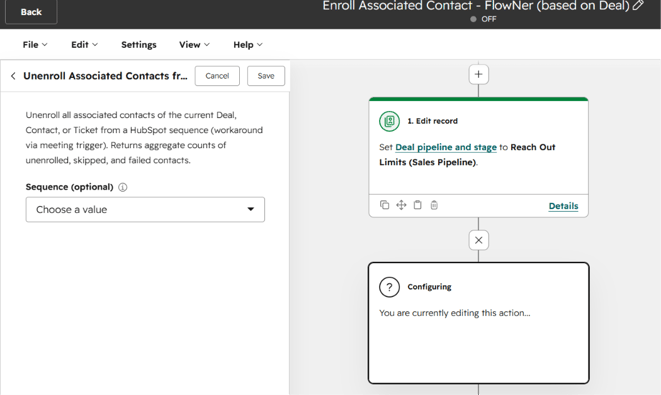
FlowNer installs as a workflow action inside a HubSpot portal, the same way it would for a single-company account. It adds two actions to the workflow editor: enroll in a sequence and unenroll from a sequence, both usable inside contact, deal, company, or ticket-based workflows - you can walk through the full setup here. Because the action lives inside FlowNer rather than inside HubSpot's native Enterprise-only enrollment step, it works the same way on Sales Hub Professional as it does on Enterprise, so agencies aren't forced into an upgrade conversation just to get workflow-driven sequence automation live for a client. There's more detail on what that upgrade would otherwise cost a small team here.
For an agency, the practical benefit is that the exact same workflow structure can be exported as a repeatable setup and installed client by client:
- Enrollment trigger - built once, based on the criteria the agency already uses to define sales-ready contacts (deal stage, form submission, lead source), then reused as the starting template for every new client portal.
- Dynamic sender - FlowNer can map the sequence sender to the contact owner property instead of a fixed rep, so the same workflow keeps working correctly as client teams change or as the agency reassigns account ownership.
- Unenrollment rule - added as a second workflow using the FlowNer unenroll action, triggered by deal stage changes like Closed Won or by a contact reply, so it doesn't get left out when a portal is set up under time pressure. A worked example of setting this up is here.
- Per-object flexibility - the same enroll and unenroll actions work from deal-based or company-based workflows, not just contact-based ones, which matters for agencies whose clients track sales activity primarily through deals.
None of this depends on a shared dashboard across portals. Each client portal still runs its own installation of FlowNer, since that's how HubSpot apps are scoped, but the workflow itself becomes a template the agency team can rebuild in minutes per client instead of reconstructing the logic from scratch. Some agencies keep that template as a exported workflow blueprint or a written setup checklist internally, so a new client portal reaches the same standard as the rest of the portfolio on day one.
Setting it up in a new client portal
- Install FlowNer from the HubSpot Marketplace in the client's portal and connect the sender inbox for whichever rep will own outbound on that account.
- Build (or clone from the agency's own template) the enrollment workflow, using the FlowNer "Enroll in Sequence" action and the trigger criteria that match the client's sales process.
- Set the sender to a dynamic contact owner rather than a fixed rep, so the workflow doesn't need editing every time the account team changes.
- Add a second workflow using the FlowNer "Unenroll" action, triggered by deal stage or reply, so contacts stop receiving sequence emails once they're no longer a fit.
- Confirm both workflows are active and note the client portal on the agency's internal tracker of accounts running automated enrollment.
Once this is repeated across a handful of portals, it stops being a one-off build and becomes the agency's standard HubSpot onboarding step for any client using sequences, regardless of which HubSpot tier that client is on.
Who should use this
- HubSpot agencies - managing sequence automation consistently across multiple client portals without pushing every account to Enterprise.
- RevOps consultants - standardizing a repeatable workflow template that can be redeployed for each new client engagement.
- Freelance HubSpot admins - setting up sales automation for solo or small-team clients who don't have in-house workflow expertise.
Agencies interested in offering this as part of client onboarding can also look at 4CRMs' partner program, which is built for teams supporting multiple HubSpot portals.
FAQ
Does FlowNer require a Sales Hub or Service Hub Enterprise subscription?
No. FlowNer's enroll and unenroll workflow actions work on Sales Hub or Service Hub Professional, which is where HubSpot's own workflow-based sequence enrollment stops being available.
Can one FlowNer setup manage sequences across multiple client portals at once?
No, each client portal runs its own FlowNer installation, since HubSpot apps are scoped per portal. What carries over between portals is the workflow template itself, which an agency can rebuild in minutes for each new client instead of designing it from scratch.
Does the unenrollment workflow need to be built separately from the enrollment workflow?
Yes. FlowNer's enroll and unenroll actions are added as two separate workflows (or two branches of workflow logic), so a client portal needs both set up for contacts to stop receiving sequence emails once they reply or a deal closes.
Can the sequence sender be different for each client's reps without editing the workflow every time?
Yes. Mapping the sender to the contact owner property means the workflow keeps sending from the correct rep automatically, even as account ownership or team structure changes.

%201.png)