
In the world of Revenue Operations, efficiency isn’t just a metric—it’s a competitive advantage. When your team is small, manual tasks are manageable. But as deal volume grows, those "quick manual updates" turn into a massive operational tax that slows down your entire revenue engine.
HubSpot now offers native cloning for many CRM records, which is a significant step forward for simple, one-off tasks. However, for teams running complex, high-volume processes, there is a fundamental difference between "copying a record" and "replicating a business process."
This guide breaks down the technical and operational differences between HubSpot native cloning and CloneNer, helping you decide which tool fits your current stage of growth.
When Manual Cloning Becomes a Hustle
For most HubSpot users, the need for advanced cloning starts when manual work feels like a "tax" on their productivity.
Imagine a Sales Rep who just closed a complex deal with 15 line items, specific discount structures, and three associated contacts. Now, they need to hand this off to the Customer Success team for onboarding.
- The Problem: With native HubSpot cloning, they can duplicate the "Deal shell," but the line items, quotes, and specific automation triggers often stay behind.
- The Hidden Cost: The rep (or a RevOps manager) spends 20 minutes manually re-entering data, re-associating records, and double-checking for errors.
- The Result: Multiplied across a team of 10 reps closing 50 deals a month, you are losing over 160 hours of high-value time to administrative data entry.
Inconsistency and Data Decay
Beyond lost time, manual cloning introduces Operational Friction. When a human has to manually "re-create" a record, errors are inevitable.
- Missing Line Items: Pricing errors occur because a rep forgot to add a specific SKU to the cloned deal.
- Association Gaps: Important stakeholders or original attachments are left behind, leaving the fulfillment team without the context they need to deliver.
- Process Fragmentation: Since native cloning is a manual action, it cannot be standardized. Every rep "clones" a little differently, leading to messy CRM data and unreliable reporting.
From "Manual Copy" to "Process Replication"
The shift from manual work to automation happens when you stop thinking about cloning as a button and start thinking about it as a Workflow Action.
If your business process dictates that "Every time a Deal is Won in Pipeline A, a Renewal Deal must be created in Pipeline B," you shouldn't rely on a human to remember to click "Clone."
True automation means the system handles the duplication, association, and SKU-level detail without any human intervention. This is where 4CRMs tools, specifically CloneNer, transform the workflow.
CloneNer vs. HubSpot Native
While HubSpot’s native tool is built for speed and convenience for one-off tasks, CloneNer is built as a duplication framework for scaling operations.
Key Feature Comparison
| Feature | HubSpot Native Cloning | CloneNer (by 4crms) |
| Trigger Method | Manual only (Actions > Clone) | Manual, Auto-Rules (IFTTT), and Workflows |
| Line Item Cloning | Limited/Manual re-entry | Automatic at the SKU level |
| Association Control | Basic associations | Deep control; choose specific associations to keep |
| Custom Objects | Enterprise only (usually) | Full support across all tiers |
| Templates | Not available | Create Cloning Templates for consistent setup |
| Cross-Pipeline | Requires manual selection | Automated routing to specific stages/pipelines |
Why CloneNer Wins for RevOps:
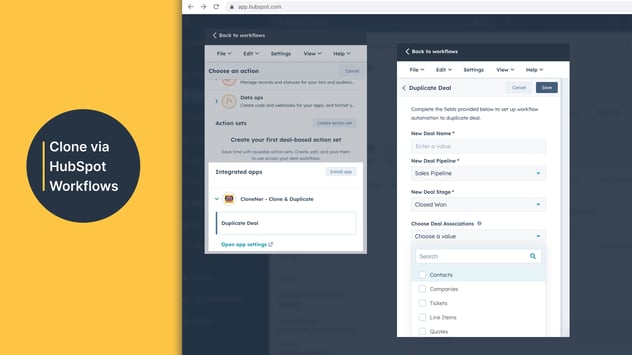
- Workflow-Based Cloning: CloneNer allows you to add a "Clone Record" action directly into your HubSpot Workflows. This means duplication happens automatically based on lifecycle changes, not manual clicks.
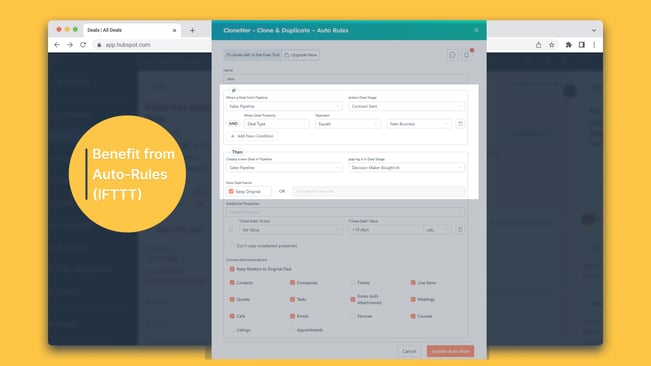
- Auto-Rules (IFTTT Logic): You can set up "If This, Then That" rules. For example: If a Deal reaches "Closed Won," clone it into the "Onboarding" pipeline and notify the owner.
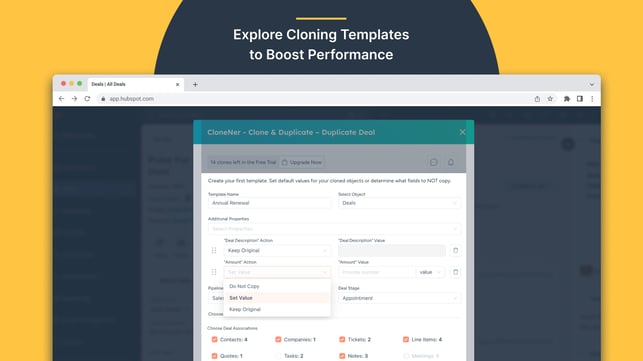
- Cloning Templates: Instead of cloning a "messy" existing record, you can create a "Gold Standard" template. This ensures every new duplicated record starts with the correct properties, naming conventions, and associations.
Real-World Example: The Post-Sales Handover
Let’s look at a practical scenario common in Manufacturing and Construction industries, where 4CRMs often helps teams scale.
The Workflow:
A Sales team closes a deal for a custom installation. This deal includes 10 specific parts (Line Items) and 3 associated contractors (Custom Objects).
- Without CloneNer: The Sales rep closes the deal. They then have to manually create a "Project Ticket," manually look up the 10 parts to add them to the ticket, and manually search for the 3 contractors to link them.
Total time: 15 minutes.
Risk of error: High. - With CloneNer: The moment the Deal stage hits "Closed Won," a HubSpot Workflow triggers the CloneNer action. A new Ticket is instantly created in the "Fulfillment" pipeline with all 10 Line Items and all contractor associations preserved.
Total Time: 0 minutes.
Final Verdict: Which One Should You Choose?
Choose HubSpot Native Cloning if:
- You only need to clone records occasionally (once or twice a week).
- You don’t use Line Items or complex associations.
- Your process is entirely manual and doesn’t require workflow automation.
Choose CloneNer if:
- You manage renewals: CloneNer makes recurring motions effortless by automating the "next" deal creation.
- You need data consistency: You want to use Templates to ensure every cloned record is perfect.
- You want to scale without hiring: You need to automate the administrative "grunt work" so your team can focus on revenue.
Getting Started
You don’t have to overhaul your CRM to see the benefits. CloneNer is a HubSpot Certified App that integrates directly into your existing portal.
Ready to stop recreating records and start automating your growth? Try CloneNer for Free on the HubSpot Marketplace