
HubSpot workflows can move records - but can they take everything connected to them along for the ride?
HubSpot is built to create repeatable processes, automate handoffs, and keep revenue teams moving. But when a business needs to duplicate a record - a deal, a ticket, a contact - and keep every association intact inside a workflow, that process breaks down fast.
That gap matters more than it looks.
A deal is never just a deal. It carries contacts, companies, line items, tickets, notes, and custom object relationships that give it meaning. If your team can only clone the record itself and loses everything connected to it, you haven't actually automated anything - you've just created more manual cleanup work downstream.
That is exactly why businesses should use CloneNer inside their workflows.
CloneNer fills a real operational gap in HubSpot by making it possible to duplicate records - deals, tickets, contacts, companies, and custom objects - along with their associations, automatically, as part of a workflow.

The problem: cloning a record without its associations isn't really cloning
When a workflow (or a person) duplicates a record but leaves its associations behind, the impact shows up almost immediately:
- the new deal exists, but the contacts and companies attached to it don't come with it
- reps have to manually re-link every contact, company, or related ticket after the fact
- downstream teams inherit a record that looks complete but is actually disconnected from its context
- reporting breaks, because association-based reports can't see relationships that were never recreated
- workflows stop short of true automation, because someone still has to finish the job by hand
This becomes especially painful for businesses with structured, relationship-heavy processes.
If your deals are tied to multiple contacts, companies, related tickets, or custom objects, cloning the deal alone solves only a fraction of the problem. The record's value comes from what it's connected to - and if those connections don't travel with it, your team is back to manual work.
That is not scalable. And it is not what teams want from a modern CRM.
What "cloning with associations" actually means in HubSpot
It's worth being precise, because this is where native HubSpot functionality and a purpose-built tool diverge.
HubSpot workflows can move a record between stages, update its properties, or trigger a notification. Native record cloning can duplicate the record's own properties. What neither does reliably on its own is decide, at the moment of cloning, which of the original record's associations should be preserved on the copy - and then recreate exactly those relationships, correctly and consistently, every single time.
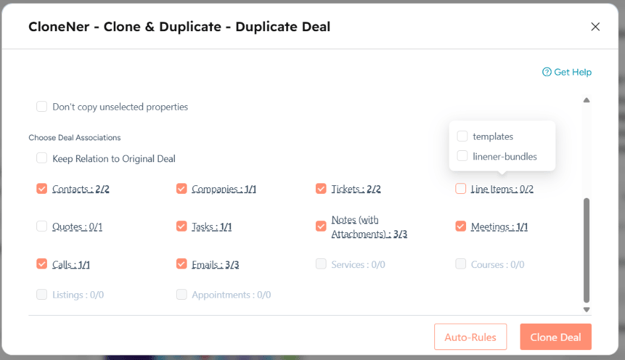
That is the specific gap CloneNer closes. When CloneNer clones a deal, a ticket, a contact, a company, or a custom object, you can choose which associations should follow the clone: related contacts, companies, tickets, line items, or connected custom objects. The copy isn't an isolated record sitting on its own - it's a fully-formed one, positioned correctly inside your CRM's web of relationships from the moment it's created.
Where this shows up in workflows
The need to clone records with their associations intact rarely appears as an abstract feature request. It shows up inside very specific, everyday motions:
Renewals and repeat business. A closed-won deal needs to become next year's renewal deal - and it needs to arrive in the new pipeline still connected to the same contacts, the same company, and the same line items, not as an orphaned record a rep has to rebuild the context for.
Multi-team handoffs. A sales deal needs a matching implementation or delivery record. That new record has to inherit the right contacts and company associations automatically, so operations doesn't start from a blank slate.
Escalations and related tickets. One customer issue often needs to become multiple internal tickets - one for support, one for engineering, one for billing - each cloned from a master ticket, each still associated with the same company and contact, so every team has full context without re-linking anything.
Custom object structures. Businesses running advanced HubSpot setups often connect custom objects to deals or tickets. When those records get cloned, the custom object relationships need to be preserved - otherwise the clone is missing the structure that made the original useful.
Auto-rule-triggered duplication. A deal reaching a specific stage triggers an automatic clone into a different pipeline. For that automation to actually save time, the clone needs to land fully connected - not as a record someone still has to finish setting up.
In each of these cases, the manual alternative is the same: someone clones the record, then spends the next several minutes re-attaching contacts, companies, and related records that should have come along automatically.
CloneNer turns HubSpot workflows into real revenue operations automation
CloneNer solves this by letting businesses clone records inside workflows while controlling exactly which associations travel with them.
Instead of relying on manual re-linking after the fact, your team can build automation that moves the full context forward with the record.
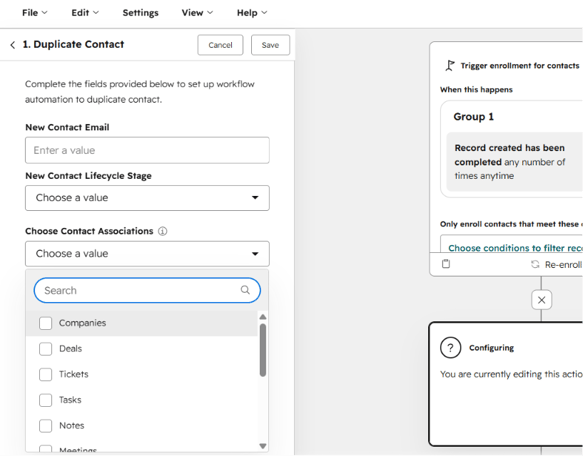
That means you can support use cases like:
- cloning a deal into a new pipeline while keeping its contact and company associations
- duplicating a ticket into a different queue while preserving its link to the original customer
- creating renewal or repeat-purchase deals that stay connected to existing line items and contacts
- passing custom object relationships along when a record is cloned into a downstream process
- standardizing handoffs between sales, success, and operations without losing relationship data
- triggering association-aware cloning automatically through Auto-Rules or workflow actions
In simple terms: CloneNer helps businesses automate the part of record duplication that HubSpot leaves unfinished - making sure a clone isn't just a copy of properties, but a genuine continuation of the record's context.
Why this matters commercially
The value of CloneNer is not just convenience. It is commercial and operational reliability.
When records can be cloned with their associations intact inside workflows, businesses get:
1. Faster deal and ticket execution
Your team spends less time re-linking contacts, companies, and related records. Reps and operators can move deals, renewals, and internal handoffs forward without a manual cleanup step.
2. Fewer broken relationships
Manually recreating associations leads to missed links, inconsistent connections, and records that quietly lose their context. Automation reduces the risk of relationship data falling through the cracks.
3. Reliable, association-aware reporting
Reports that depend on associations - which contacts belong to which deals, which tickets tie back to which company - only work if those associations actually exist. Cloning that preserves associations keeps that reporting trustworthy.
4. More value from HubSpot workflows
Many teams invest in workflows expecting full operational automation. But if a cloned record arrives disconnected from its associations, the automation is incomplete - someone still has to finish the job. CloneNer closes that gap.
5. Stronger scalability
As volume grows, manually re-linking associations after every clone becomes a bottleneck. CloneNer removes that repetitive work so the business can scale without adding operational overhead.
Who feels this gap the most
Not every HubSpot user needs association-aware cloning - but for certain teams, it is close to essential:
- RevOps and Sales Ops teams, who are responsible for the integrity of the data model and who inherit the cleanup work when clones lose their associations.
- Businesses with multi-record processes, where a single sale spans a deal, related tickets, and custom objects that all need to move together.
- Renewal- and subscription-driven businesses, where the same contacts, companies, and product structures need to reappear cleanly, cycle after cycle.
- Service and support teams, who route escalations across multiple internal tickets that still need to reference the same customer.
The real issue: this feels like a feature HubSpot should already have
That is the strongest reason CloneNer resonates with users.
This is not a "nice-to-have" edge case. It is a practical workflow need for any business whose records depend on their relationships to be useful.
Teams often assume HubSpot should already handle this:
- If workflows can move records, update properties, and trigger actions, why can't they decide which associations travel with a clone?
- If HubSpot's data model is built entirely around relationships between records, why does cloning strip those relationships away by default?
- If HubSpot is meant to power operational scale, why does preserving associations during duplication still require manual work?
These are fair questions.
And that is exactly why CloneNer is compelling: it solves a real, obvious gap that businesses encounter the moment they try to operationalize record duplication at a higher level.
CloneNer is built for teams that want less workaround and more execution
The best apps do not invent artificial needs. They remove friction that users already feel.
CloneNer does that by giving businesses a capability that makes immediate sense the moment they see it.
It helps teams:
- eliminate the manual work of re-linking associations after every clone
- reduce process breakdowns between teams that depend on shared context
- automate revenue operations more fully, without losing relationship data
- keep cloned records accurate, connected, and immediately usable
- get more practical value from HubSpot workflows and Auto-Rules
That makes CloneNer easy to understand, easy to justify, and easy to sell.
Frequently asked questions
Can I choose which associations get cloned, or does CloneNer copy everything by default?
CloneNer lets you select which associations should follow the clone - contacts, companies, tickets, line items, or custom objects - so you control exactly what context the new record inherits.
Does this work for records other than deals?
Yes. CloneNer supports association-aware cloning for deals, tickets, contacts, companies, and custom objects, not just one object type.
Can association-aware cloning be triggered automatically, or does it require manual action each time?
It can run manually, through Auto-Rules ("if this, then that" logic), or as a workflow action - so cloning with associations can be fully automated as part of your existing processes.
Does cloning associations also carry over line items and custom properties?
Yes - when you clone a deal, line items and custom properties can travel with the clone alongside the associations you choose to preserve.
Final takeaway
If your business relies on HubSpot records whose value comes from what they're connected to, CloneNer is not just useful - it solves a missing operational capability.
HubSpot is strong at automation, but when it comes to cloning records without losing their associations, there is still a gap.
CloneNer fills that gap.
It helps businesses move faster, keep their data model intact, and automate record duplication with real relationship-level precision.
And that is exactly why businesses should use it: because a clone that loses its associations isn't automation - it's just a copy with extra steps.
CloneNer gives teams the workflow automation they thought they already had.

%201.png)