
Renewals are one of the most predictable revenue streams in any recurring business model. Yet in HubSpot, renewal deals often create operational friction due to inconsistent deal structure, missing line items, outdated pricing, and manual cloning. Even teams with strong process discipline eventually face errors and delays because native HubSpot tools do not provide automated and accurate deal cloning.
Renewal operations depend on contract end dates, subscription rules, term logic, and pricing standardization. RevOps teams need a reliable mechanism that ensures every renewal deal enters the pipeline with clean data, correct pricing, and a consistent structure. HubSpot workflows can initiate renewals, but they do not clone deals with line items or apply a standard blueprint. CloneNer was created to fill this automation gap.
This article explains why renewal deals are challenging in HubSpot, how workflows support renewal triggers, and how CloneNer templates provide a complete automation layer through property-level rules, token-based calculations, association control, and pipeline mapping.
Why Renewal Deals are Difficult to Manage
RevOps teams usually follow a predictable renewal sequence:
1 - monitor contract end date
2 - notify account owners about renewal readiness
3 - clone or recreate a renewal deal
4 - rebuild line items and pricing
5 - add renewal-specific metadata
6 - assign ownership and tasks
7 - continue forecasting
The primary bottleneck appears in steps 3 and 4. HubSpot does not allow workflows to clone deals with line items, so teams often face:
-
Missing or outdated line items
-
The previous term discounts carried over unintentionally
-
Legacy SKUs or product bundles that no longer match the current offer
-
Inconsistent deal properties
-
Reporting and forecasting misalignment
Manual cloning also introduces a high error rate, especially when contract volumes grow.
How HubSpot Workflows Support Renewal Triggers
HubSpot workflows are powerful for automation, especially when renewals depend on predictable signals like contract dates or subscription milestones. They can trigger renewal-related processes based on the data that already exists on the deal. This makes workflows a strong foundation for starting the renewal flow, even though they cannot build renewal deals themselves.
Workflows can be triggered by:
-
contract end date
-
renewal reminder windows based on date minus X days
-
term length stored in a custom property
-
lifecycle stage changes
-
subscription information is maintained in custom fields
-
owner changes or internal handoff rules
Once triggered, a workflow can automate several renewal-related steps:
-
notify account owners
-
create renewal tasks
-
update deal or company properties
-
assign ownership
-
send internal reminders
-
create a new deal to represent the upcoming renewal
This supports early awareness and structured handoff during the renewal cycle. However, workflows are limited when it comes to creating the actual renewal deal with the correct structure.
What CloneNer Adds to the Renewal Workflow
CloneNer enables full-scale renewal automation by providing:
1 - accurate deal cloning
2 - template-based structure
3 - property level rules
4 - date calculations
5 - pricing and line item consistency
6 - association control
7 - automated pipeline placement
This transforms HubSpot into a true renewal automation engine.
How CloneNer Templates Work
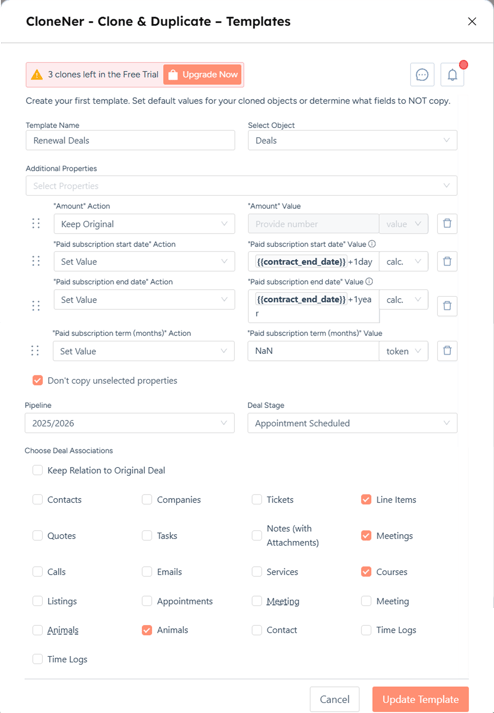
CloneNer templates define how a new deal should be built inside a workflow. They serve as detailed blueprints that specify which properties to copy, which values to calculate, which associations to include, and which pipeline and stage to use.
A template contains several key components:
1 - Template Name and Bound Object
Each template is created for a specific HubSpot object. For renewals, the object is typically a deal. You define:
-
template name
-
object type
This ensures all rules are applied consistently whenever the template is used in a workflow.
2 - Property Rule Variations
Every property in a template supports three rule types.
keep original
The system copies the value exactly as it appears in the original deal.

set value
You define a new value. This can be:
-
a static value
-
a HubSpot token
-
a token plus a calculation
Examples:
-
subscription start date = contract end date +1 day
-
renewal close date = contract end date +30 days
-
renewal end date = subscription start date + 1 year
This logic supports complex renewal scenarios without manual work.

do not copy
The value from the original deal is not carried over. This is often used for:
-
deal stage
-
close date
-
probability
-
internal fields
-
values that should be recalculated
This prevents outdated or incorrect values from entering the renewal pipeline.

3 - Advanced Token and Calculation Support
CloneNer supports dynamic property creation through calculations such as:
-
date + 1 day
-
date + 1 month
-
date + 1year
-
number-based formulas
-
token-based strings
This means RevOps teams can automate:
-
term length rules
-
renewal window offsets
-
pricing adjustments
-
contract alignment logic
Everything stays consistent across all renewal deals.
4 - Pipeline and Deal Stage Configuration
Every template allows you to define where the renewal deal should appear:
-
pipeline selection
-
initial deal stage

Examples:
-
pipeline = Renewal
-
stage = Renewal initiated
-
stage = Pending approval
-
stage = Waiting for negotiation
This makes forecasting reliable and removes manual movement between pipelines.
5 - Association Control
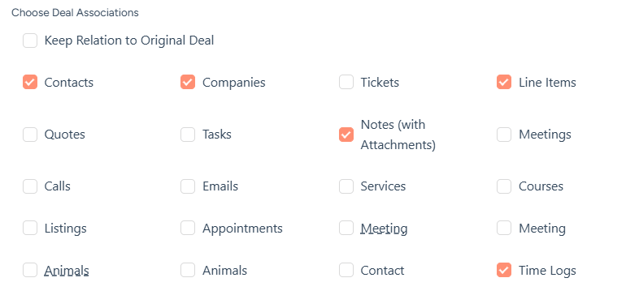
Templates let you choose which associations are copied:
-
companies
-
contacts
-
products
-
custom objects
-
tickets
-
subscriptions
You can keep all or only essential associations. This prevents unnecessary clutter or irrelevant legacy links.
6 - Workflow Integration
Once a template is ready, you use it inside any workflow:
1 - open workflow
2 - add action
3 - find the CloneNer card
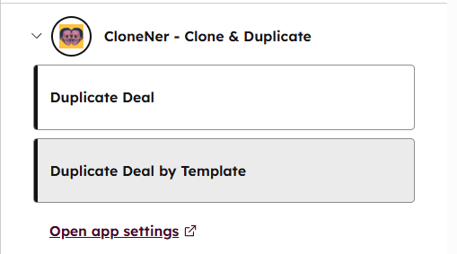
4 - select the template
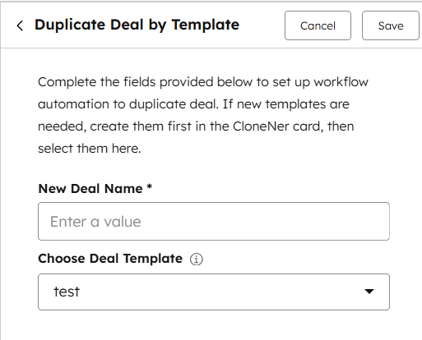
5 - turn on the workflow
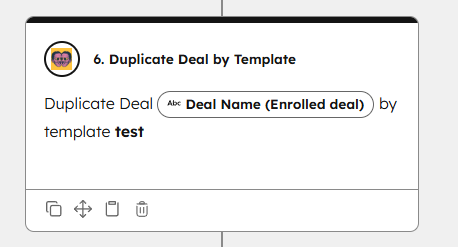
When the workflow runs, HubSpot automatically creates a new deal based on every rule defined in the template.
Workflows detect the renewal moment, and templates define how the renewal deal should look.
Putting It All Together - A Fully Automated Renewal Workflow
A complete renewal automation setup looks like this:
Trigger
Contract end date is 90 days away.
Workflow Actions
1 - identify the renewal segment
2 - choose template
3 - apply the CloneNer template
4 - clone the deal
5 - place the renewal deal into the pipeline
6 - update renewal-specific properties
7 - assign account owner
8 - generate follow-up tasks
9 - notify the account team
Outcome
A renewal deal is automatically created with clean line items, updated values, correct associations, accurate dates, and a consistent structure.

%201.png)