
For RevOps professionals and sales leaders, growth is the ultimate goal. But as deal volume increases, a subtle, often overlooked problem begins to drain your team’s productivity: manual data entry. Specifically, the repetitive, tedious process of adding, updating, and managing products and line items inside HubSpot deals.
When your sales team is managing a handful of deals a month, manually searching for products, adjusting prices, and adding line items one by one feels manageable. But what happens when your team is closing dozens or hundreds of deals? What happens when your pricing model includes multiple tiers, setup fees, add-ons, and recurring subscriptions?
The reality is that sales reps start spending more time configuring deals than they do selling. Errors creep in. Pricing becomes inconsistent. RevOps teams find themselves constantly policing data quality instead of building scalable systems.
This isn't a failure of your team; it's a failure of the process. In this article, we’ll explore the operational friction caused by manual product management in HubSpot, why a shift toward an automation mindset is necessary for scaling teams, and how you can use tools like LineNer Bundles to eliminate the busywork and keep your team focused on revenue.
The Anatomy of Operational Friction in Deal Management
To understand the solution, we first need to look at the reality of how deals are typically built inside HubSpot.
HubSpot is an incredible foundational platform for centralizing your CRM data and standardizing your sales process. However, when it comes to the specific mechanics of deal configuration - particularly around complex line items - native functionality can sometimes require more manual clicks than a fast-moving sales team can afford.
Consider a standard B2B SaaS deal. A single deal might require the following line items:
- A core software subscription (Tier 1, Tier 2, or Enterprise).
- A one-time implementation or onboarding fee.
- Premium support add-ons.
- Additional user seats or consumption-based credits.
If a sales rep has to manually search the HubSpot product library for each of these items, add them to the deal, manually apply the correct discounts, and ensure the billing frequencies (monthly vs. annually) are accurate, they are spending valuable minutes on administrative tasks.
Multiply those minutes by the number of deals in their pipeline, and the operational friction becomes glaringly obvious.
The Downstream Impact of Manual Product Entry
The cost of manual deal configuration extends far beyond the time lost by the individual sales rep. It creates a ripple effect across the entire organization:
1. Revenue Leakage and Pricing Errors
When humans manually enter data, mistakes happen. A rep might accidentally select an outdated product SKU, apply a discount that exceeds their approved threshold, or forget to include a mandatory implementation fee. These errors lead to inaccurate quotes, billing discrepancies, and ultimately, revenue leakage.
2. Skewed Forecasting and Reporting
For Sales Leaders and RevOps professionals, accurate forecasting relies entirely on accurate deal data. If line items are missing or incorrectly priced until the very last stage of the deal, your pipeline visibility is compromised. You cannot make strategic decisions based on flawed data.
3. Frustrated Sales Teams
Salespeople want to sell. When they are forced to navigate clunky administrative processes, their momentum stalls. Operational frustration leads to poor CRM adoption, as reps look for workarounds or delay updating their deals until the end of the month.
4. The RevOps Bottleneck
RevOps teams are tasked with scaling processes, not fixing typos. When manual errors inevitably occur, RevOps becomes the cleanup crew. This reactive work prevents them from focusing on high-leverage projects that actually drive the business forward.
The Automation Insight: Let HubSpot Handle the Routine Work
The core philosophy of operational efficiency is simple: Automation is not about replacing people; it’s about removing repetitive work so teams can focus on high-value activities.
If your sales reps are rebuilding similar deals manually, they are doing work that software should be doing for them. Customers don't buy from you because your reps are great at clicking buttons in a CRM; they buy because of the relationships, the problem-solving, and the value your team provides.
To scale your operations without scaling complexity, you must shift your mindset. You must look at every repeatable action your team takes and ask: "Can this be standardized and automated?"
In the context of product management in HubSpot, the answer is yes. You don’t need to change the way your team sells - you just need automation handling the repetitive parts of deal configuration.
HubSpot provides the foundation. But to truly accelerate execution, you need practical automation extensions that eliminate the friction where manual work begins.
Rethinking Line Items: A Smarter Approach to Product Management
When you analyze how products are sold, you'll quickly realize that they are rarely sold in isolation. Customers typically buy packages, solutions, or bundles.
If you are selling a "Standard Onboarding Package," that package likely consists of the same 3-4 line items every single time. Why should a rep have to add those 3-4 items individually for every new deal?
This is where the concept of automated line item management comes into play. By grouping commonly sold products together and automating their addition to deals, you solve the root cause of the inefficiency.
This approach ensures:
- Consistency: Every quote goes out with the exact right combination of products and pricing.
- Speed: Deals are configured in seconds, not minutes.
- Accuracy: The margin for human error is virtually eliminated.
How to Manage Products inside HubSpot using LineNer Bundles
This is exactly the problem that LineNer is designed to solve. LineNer is a lightweight automation extension built specifically for HubSpot daily users. It doesn't replace HubSpot; it enhances it by giving you the tools to automate line item management at scale, without requiring custom development or enterprise complexity.
One of the most powerful ways to use LineNer to streamline your sales process is through its Bundles feature.
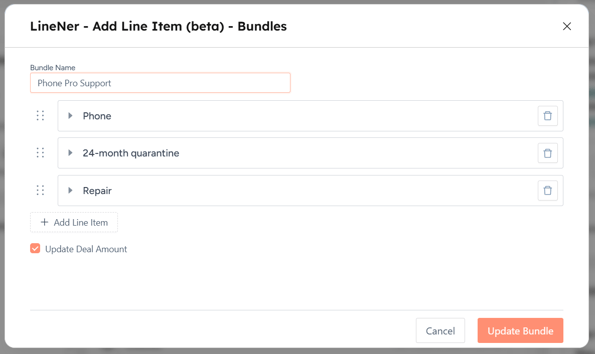
What are LineNer Bundles?
LineNer Bundles allow you to group multiple HubSpot products into a single, standardized package. Instead of manually searching for and adding individual line items to a deal, you can use a HubSpot workflow to automatically apply an entire Bundle of products the moment a deal meets specific criteria.
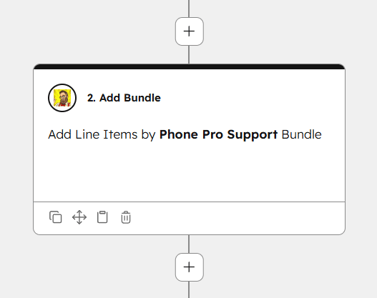
With bundles, adding line items is faster - add a whole set of products in one click. No more repetitive work, just quick, consistent deals every time.
How Bundles Transform Deal Management
Let's break down the practical outcomes of using LineNer Bundles in your daily operations:
1. Standardize Your Go-To-Market Packages
If your company sells predefined tiers (e.g., Basic, Pro, Enterprise), each tier likely has a specific set of associated costs - software licenses, support SLAs, and setup fees. With LineNer, you configure these as Bundles once. When a rep categorizes a deal as "Pro Tier," a workflow automatically attaches the exact line items that belong in the Pro Bundle.
2. Automate Upsells and Cross-sells
You can use HubSpot workflows to automatically trigger the addition of complementary products based on deal properties. If a customer is buying a specific piece of hardware, LineNer can automatically bundle the associated warranty or maintenance plan as a line item on the deal, ensuring reps never forget to include critical cross-sells.
3. Enforce Pricing and Discounting at Scale
Because the Bundles are pre-configured, you control the pricing and the applied discounts centrally. If you decide to update the pricing of your "Starter Package," you update the template, and every future deal will automatically reflect the correct, enforced pricing. This eliminates the risk of rogue discounting by individual reps.
4. Support for Complex Deal Structures
LineNer supports advanced property configuration and decimal precision (e.g., 4.5234), which is critical for manufacturing, construction, or usage-based pricing models where exact calculations are necessary.
A Real-World Example: Automating the SaaS Sales Motion
Let’s look at how a RevOps expert might deploy LineNer Bundles for a B2B software company to remove friction from the sales team.
The Old Way (Manual):
- A sales rep qualifies a prospect for the "Growth Package."
- The rep creates a new deal in HubSpot.
- The rep manually searches the product library for "Growth Software License - Annual."
- The rep remembers they need to add the "Standard Implementation Fee" and searches for that.
- The rep searches for the "Premium Support Add-on."
- The rep manually applies a 10% discount to the software license as approved by their manager.
- The quote is finally ready to generate.
Time taken: 5-10 minutes. Risk of error: High.
The New Way (Automated with LineNer):
- RevOps creates a "Growth Package Bundle" inside LineNer, containing the software license, implementation fee, and support add-on, with pre-approved pricing and discounts.
- A sales rep creates a new deal and selects "Growth Package" from a custom dropdown property in HubSpot.
- A HubSpot workflow triggers in the background.
- LineNer automatically populates the deal with the complete "Growth Package Bundle" line items instantly.
Time taken: 10 seconds. Risk of error: Zero.
By deploying this simple automation, the RevOps professional has just saved their sales team hours of manual data entry every single week, ensured 100% pricing accuracy, and accelerated the time-to-quote. This is the definition of operational efficiency.
Expanding the Automation Ecosystem
While automating line items with LineNer Bundles is a massive step forward, it is often just the beginning of unlocking true productivity inside HubSpot. When you embrace the automation mindset, you start to see opportunities to remove manual effort everywhere.
If your team struggles with manually recreating similar deals week after week, you might look at tools like CloneNer to instantly duplicate deals and tickets, bringing over all the relevant data and line items in one click.
If your reps are constantly wasting time copying products from a renewal deal to an upsell deal, an extension like Copy Line Items Between Deals can transfer that data instantly.
The goal is not to buy features; the goal is to build an ecosystem of practical automation tools that make HubSpot easier to use, not more complicated. By stringing together small workflow improvements, you create a massive operational impact. You stop asking your team to be data administrators, and you empower them to be revenue generators.
Conclusion: Stop Rebuilding Deals from Scratch
Growth shouldn't mean more administrative burden. If your deal volume is increasing, your manual processes will eventually break. Workflows will get messy, errors will appear, and your team's frustration will grow.
You don't need a massive enterprise overhaul to fix this. You just need practical, targeted automation that extends HubSpot where the manual work begins.
By utilizing LineNer Bundles, RevOps and Sales Leaders can eliminate the repetitive busywork of deal configuration. You can guarantee pricing accuracy, speed up the quoting process, and give your sales team their time back.
Ready to automate your recurring processes and save hours every week?
Stop wasting time on manual updates and data entry. Try LineNer today and discover how easy it is to manage products, automate line items, and streamline your sales workflows directly inside HubSpot.
[Try 4CRMS LineNer and start automating your line items today.]