
If you work in HubSpot every day, you already know the drill. A new customer comes in and you're rebuilding a deal from scratch. A renewal comes up and you're manually copying line items, associations, and notes from last year's contract. A big enterprise account needs the same deal structure set up across a dozen locations, and you're doing it one painful record at a time.
None of that is a HubSpot problem, exactly. HubSpot doesn't have a native way to duplicate a record and keep its associations, line items, and custom properties intact. So teams either build their own workarounds, hire a RevOps person to do it by hand, or just accept the busywork as a cost of doing business.
CloneNer exists to remove that cost. It's a HubSpot app that clones deals, contacts, companies, tickets, and custom objects - along with their associations, line items, and properties - in a couple of clicks or fully automatically through workflows. If you're setting it up for the first time, our CloneNer setup guide walks through the basics. Below are the ten most common ways teams actually use it, based on what we see across our customer base.

1. Renewal Deals
Who uses this: Customer Success Managers and Account Managers at subscription and contract-based businesses.
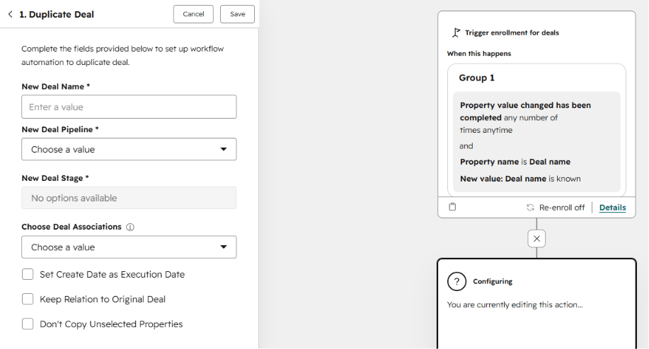
What happens: When a deal closes as Won, CloneNer automatically creates next year's (or next quarter's) renewal deal, carrying over the customer, the products, the associations, and the deal structure. Only the dates and amounts need adjusting.
Why cloning makes sense here: A renewal deal is, structurally, almost identical to the deal that came before it. Same contact, same company, same product mix, same line items in most cases. Recreating that from a blank deal record every single time is pure friction - and it's the kind of task that gets pushed to the bottom of a CSM's to-do list, which is exactly how renewals slip through the cracks.
With CloneNer connected to a workflow, the renewal deal appears automatically the moment the current deal is marked Won, sitting in the pipeline stage you define, ready for the CSM to review and adjust rather than build from scratch. If you want a full walkthrough of setting this up, we cover it step by step in how to automate renewals in HubSpot.
2. Upsell and Expansion Deals
Who uses this: Account Executives at land-and-expand companies, where the first deal is just the beginning of the relationship.
What happens: Instead of creating a brand-new deal for an upsell conversation, the rep clones the existing deal and adds the new products or line items to it.
Why cloning makes sense here: By the time an upsell conversation starts, there's already a deal record full of useful context - notes from past calls, the original pricing, the associated contacts and company, maybe attached documents. None of that should have to be rebuilt. Cloning keeps all of that history intact on the new deal, so the rep walks into the expansion conversation with full context instead of starting from zero.
This also keeps reporting cleaner. When expansion deals are cloned from the original rather than created independently, it's much easier to trace revenue expansion back to the account it came from, which matters a lot when you're trying to measure net revenue retention.
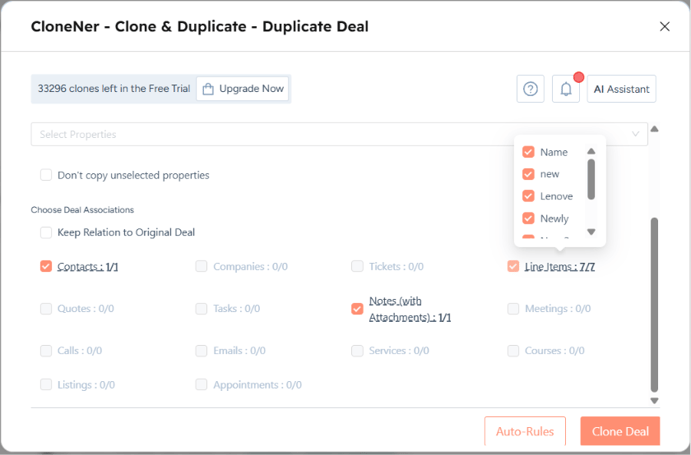
Since CloneNer carries over line items along with the rest of the deal, the rep isn't rebuilding the product list from scratch either - they're only adding what's new.
3. Multi-Location Deals
Who uses this: Enterprise sales teams in industries like energy, construction, and manufacturing, where one customer might have deals across many physical sites.
What happens: A deal gets cloned anywhere from five to fifty times (or more), once per customer location, keeping the same product mix and pricing structure but pointing to a different delivery site each time.
Why cloning makes sense here: In these industries, the sales conversation usually happens once, at the account level, but the actual deal execution needs to be tracked location by location - for delivery logistics, for local billing, for site-specific service scheduling. Building each of those location-level deals manually is a multi-hour job for a rep or RevOps person, and it's exactly the kind of repetitive task that's prone to copy-paste errors (wrong pricing tier, missed line item, wrong associated contact).
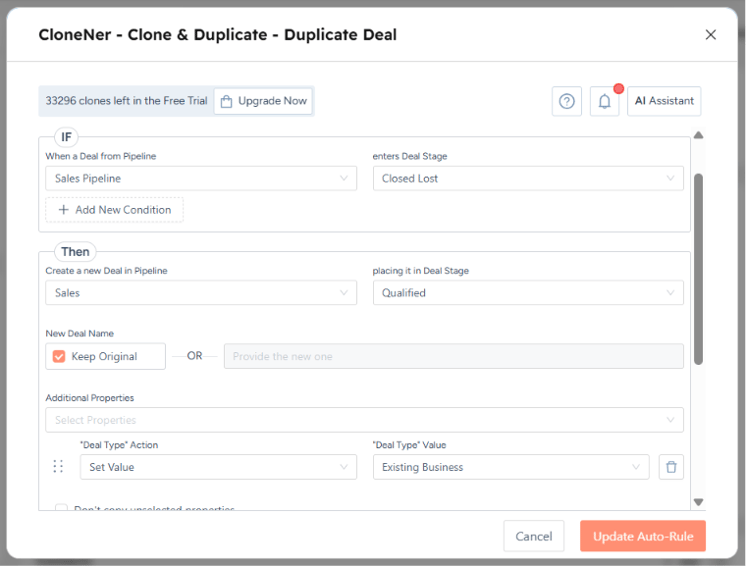
CloneNer handles this by cloning the parent deal record location by location, keeping the product mix identical while letting the rep swap in the site-specific details afterward. What used to be an afternoon of manual data entry becomes a five-minute review task. For teams running this at volume, setting up auto-rules and workflow triggers means the location-level deals get created without anyone kicking off the clone manually each time.
4. Template Deals
Who uses this: Sales Managers and RevOps teams that have standardized what a "good" deal looks like and want every rep following the same structure.
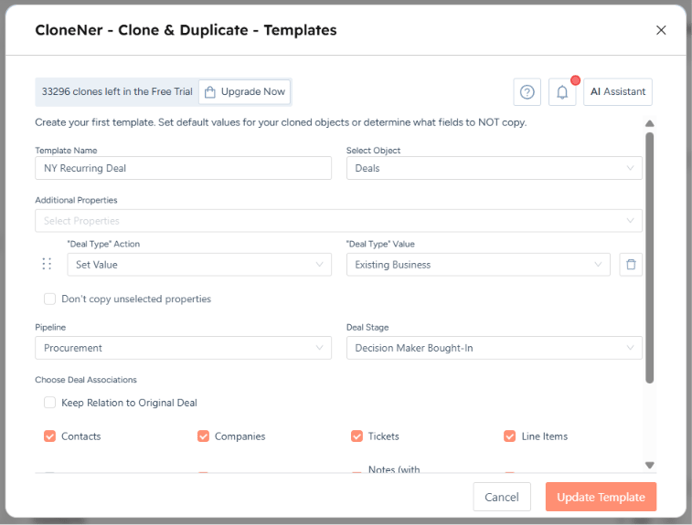
What happens: A template deal is set up once, with the correct pipeline stage, standard line items, and required properties filled in. Every new deal starts as a clone of that template rather than a blank record.
Why cloning makes sense here: Deal hygiene is one of those things everyone agrees matters and almost no team actually enforces consistently, because enforcing it manually means a manager reviewing every new deal a rep creates. Template cloning flips that. If the template is correct, every deal born from it is correct by default - same required fields populated, same starting pipeline stage, same standard line items already attached.
This matters most for teams that have been burned by messy pipeline data before: deals missing amounts, deals sitting in the wrong stage, deals with no line items at all making forecasting unreliable. Starting from a clone of a clean template removes most of that risk at the source, rather than trying to clean it up after the fact. We go deeper on building and maintaining these blueprints in our guide to eliminating manual data entry with deal and ticket templates.
5. Pipeline-to-Pipeline Handoff
Who uses this: Organizations running a multi-pipeline strategy, where a deal moves from a sales pipeline into an implementation or renewal pipeline once it's won.
What happens: When a deal reaches Closed Won in the sales pipeline, CloneNer clones it into the next pipeline - implementation, onboarding, or renewal - carrying over the associations and relevant properties.
Why cloning makes sense here: Multi-pipeline setups exist because a sales-stage deal and an implementation-stage deal genuinely need different properties, different stages, and often different owners. But that structural separation creates a real handoff problem: how does the implementation team get the context the sales team built up over months of conversations, without someone manually re-entering it?
Cloning solves this cleanly. The new pipeline gets its own deal record, tailored to its own stages, but it's not starting blind - the customer, the products sold, the notes, and the associations are already there. This is one of the most common patterns we see from customers doing sales-to-delivery handoffs - we walk through several real setups, including the auto-rule logic behind them, in Stop Rebuilding Deals and Tickets in HubSpot.
6. Cross-Sell Deals
Who uses this: Multi-product companies where an existing customer for Product A is a good candidate for Product B.
What happens: The rep clones the existing deal for the account and swaps in the new product line, rather than creating a fresh deal from scratch.
Why cloning makes sense here: The hard part of a cross-sell isn't the product pitch, it's making sure the account context carries over correctly - the right company association, the right primary contact, the right billing details. All of that already lives on the original deal. Cloning it means the rep is only changing one thing (the product), instead of re-entering everything else and risking a mismatch between the new deal and the account's actual records.
It also keeps your reporting honest. If cross-sell deals are consistently cloned from the original account relationship, it's much easier to see, at a glance, how much revenue is coming from expanding existing accounts versus net-new logos.
Because CloneNer carries the deal's existing associations and properties along with it, the rep is only touching the product line - everything else about the account relationship stays intact and correct.
7. Win-Back and Re-Engagement Deals
Who uses this: Sales reps running win-back or re-engagement campaigns against accounts that previously churned.
What happens: The old, closed-lost (or churned) deal gets cloned as the starting point for a new re-engagement deal.
Why cloning makes sense here: A churned deal is actually a pretty valuable record - it usually has the historical pricing, the products the customer originally bought, and often a churn reason logged somewhere. Starting a win-back conversation from a blank deal throws all of that away and forces the rep to either dig through old notes or, more likely, just wing it.
Cloning the original deal keeps the history attached, so the rep (or their manager) can see exactly what was sold before, what it cost, and ideally why it ended, before making the new pitch. That context alone tends to change how the re-engagement conversation is framed - a rep who knows the account churned over a pricing objection is going to approach the call very differently than one who doesn't.
8. Recurring Service and Retainer Deals
Who uses this: Agencies, managed service providers (MSPs), and consulting firms that bill repeatedly - monthly, quarterly, or per project cycle.
What happens: A new deal gets created for each billing period, cloned from the previous period's deal, with only the dates and amounts changing.
Why cloning makes sense here: For a retainer-based business, this month's deal and last month's deal are, structurally, nearly identical. Same client, same scope of work, same line items in most cases. Manually recreating that deal record every single billing cycle, across every single client, adds up to a genuinely significant amount of admin time over a year - time that isn't billable and doesn't move the business forward.
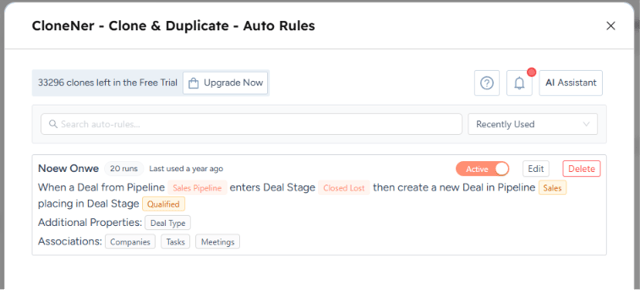
Automating this with CloneNer means the new period's deal is generated on a schedule (or triggered off the previous deal closing), already populated with the recurring line items, so account managers are reviewing and adjusting rather than rebuilding from nothing every time. This is exactly the kind of scenario CloneNer's automated auto-rules feature was built for.
9. Seasonal and Campaign Replication
Who uses this: Businesses in industries with strong seasonal patterns - energy, construction, retail, and similar sectors where the same customer buys again on a yearly cycle.
What happens: Last year's deal gets cloned as the starting template for this year's version, with pricing adjusted for annual increases and any product changes applied on top.
Why cloning makes sense here: Seasonal deals repeat with enough consistency that starting from scratch every cycle is wasted effort, but they're not identical enough to just re-run the exact same deal unchanged - pricing moves, product lines shift slightly, sometimes the scope grows or shrinks. Cloning gives reps the best of both: a fully built starting point that captures everything that stayed the same, with room to adjust only what actually changed.
This is particularly valuable for teams managing a large volume of seasonal accounts at once, where the alternative - manually recreating dozens or hundreds of deals every season - simply isn't realistic without adding headcount. If you're new to the concept, our comprehensive guide to duplicating deals in HubSpot is a good place to see the mechanics in action before applying them to a seasonal cycle.
10. Deal Splitting
Who uses this: Enterprise RevOps teams and sales operations working with complex deal structures that need to be broken apart.
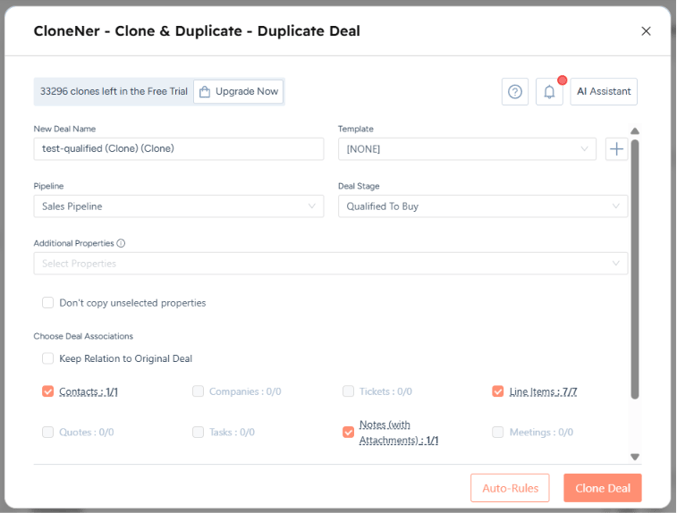
What happens: A large parent deal gets cloned into multiple sub-deals - split by product line, project phase, or business unit - with each clone then trimmed down to only the line items relevant to that piece.
Why cloning makes sense here: Splitting a deal is really a subtraction problem, not an addition problem. The easiest way to create three accurate sub-deals from one large deal isn't to build each one from zero; it's to clone the parent deal three times and remove what doesn't belong in each copy. That way every sub-deal inherits the correct associations, the correct customer information, and the correct baseline pricing, and the only manual work left is deciding which line items stay and which get removed.
This use case comes up most often in complex B2B sales - multi-phase implementations, deals spanning multiple business units, or contracts that need to be tracked separately for revenue recognition even though they were sold as one package. Since the trimming step means removing specific line items from each clone, it's worth setting the associations and clone rules up carefully from the start so each sub-deal ends up with exactly what it needs and nothing more.
Why Record Cloning Matters More Than It Seems
None of these ten use cases are exotic. They're the everyday reality of running a sales or CS team inside HubSpot. What they have in common is that they all involve recreating a record that's 80–95% identical to one that already exists, and doing it by hand every single time is a quiet but constant drain on rep and RevOps time.
CloneNer isn't trying to reinvent how deals work in HubSpot. It's built to remove the copy-paste step that HubSpot never solved natively - cloning a record along with its associations, line items, and properties, either on demand with a click or automatically through a workflow trigger. Whether that's a renewal firing off the moment a deal closes, a template deal being duplicated for every new customer, or a parent deal being split into a dozen sub-deals for an enterprise rollout, the underlying job is the same: stop rebuilding what already exists.
If any of these ten patterns sound like your week, take a look at the CloneNer product page for pricing and features, or head straight to the setup guide to get your first clone rule running.
Frequently Asked Questions
What is CloneNer and how does it work with HubSpot?
CloneNer is a HubSpot app that duplicates records - deals, contacts, companies, tickets, and custom objects - while preserving their associations, line items, and property values. It can be triggered manually from within a record or automatically through HubSpot workflows.
Can CloneNer clone associations, not just the record itself?
Yes. Associated contacts, companies, and other linked records carry over with the clone, so you're not left rebuilding relationships between records after the fact.
Does CloneNer only work with deals?
No. While many of the use cases above focus on deals, CloneNer supports cloning contacts, companies, tickets, and custom objects as well, wherever duplicating a record with its associations and properties saves time.
Can cloning be triggered automatically, or does someone have to do it manually every time?
Both. CloneNer can be triggered manually from a record for one-off cloning, or set up inside a HubSpot workflow so it runs automatically based on a trigger - a deal closing as Won, a specific date, or a property change, for example.
Will line items and pricing carry over when a deal is cloned?
Yes, line items are cloned along with the rest of the deal, which is one of the main reasons teams use CloneNer for renewals, upsells, and recurring service deals where the product mix largely stays the same.
Is CloneNer suitable for enterprise-scale cloning, like multi-location deals?
Yes. Teams handling multi-location rollouts or large deal splits use CloneNer specifically because manually recreating dozens of near-identical deal records isn't practical at that scale.
Does cloning a deal affect the original record?
No. Cloning creates a new, independent record. The original stays exactly as it was, untouched by the cloning process.
How is this different from just duplicating a record manually in HubSpot?
HubSpot doesn't offer native record duplication with associations and line items intact. Manually recreating a record means re-entering every property, re-associating every contact and company, and re-adding every line item by hand. CloneNer automates all of that in one action.
Can I control which properties or line items get carried over in a clone?
Yes, CloneNer lets you configure what gets cloned, so teams can set up templates or rules that fit their specific process rather than cloning everything indiscriminately.
Who typically sets up CloneNer inside a HubSpot portal?
Usually RevOps, Sales Operations, or a HubSpot admin sets up the cloning rules and workflow triggers, after which reps and CSMs use the cloning feature directly from their records without needing to touch the configuration themselves.